RomRaider Logo

RomRaider

Open Source ECU Tools
 FAQ •  Register •  Login 

RomRaider

Documentation

Community

Developers

It is currently Fri Dec 26, 2025 7:06 am

All times are UTC - 5 hours [ DST ]


Post new topic Reply to topic  [ 4 posts ] 
Author Message
 Post subject: Howto: use native GTK look and feel with RomRaider in Linux
PostPosted: Sun Jul 29, 2007 4:21 pm 
Offline
Newbie

Joined: Mon Jun 18, 2007 7:25 pm
Posts: 89
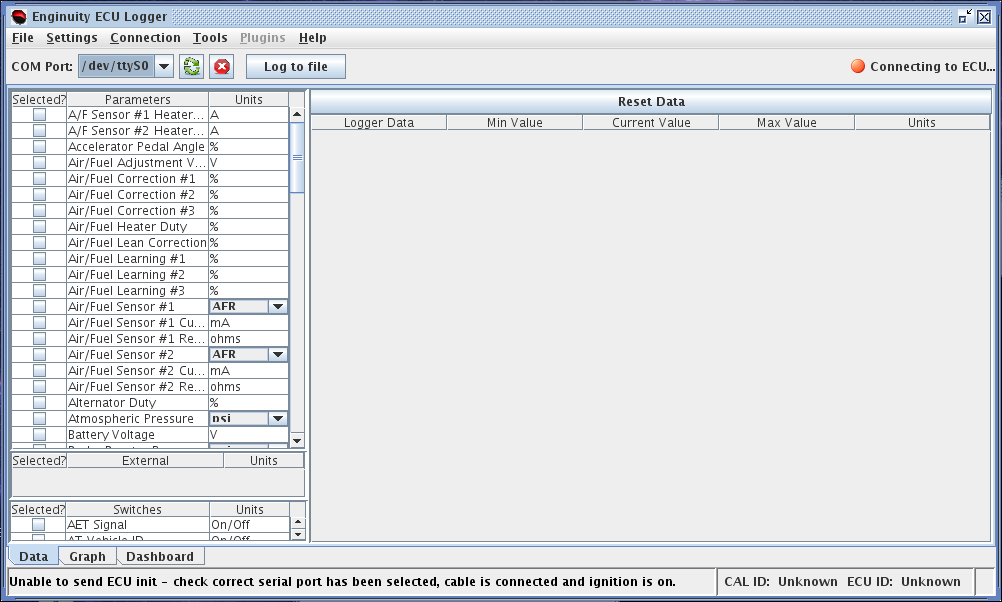
I really like RomRaider, but it is ugly looking in linux - it uses the default 'Metal' look and feel for swing applications. So if you add this switch to the launcher for RomRaider, before '-jar', : -Dswing.defaultlaf=com.sun.java.swing.plaf.gtk.GTKLookAndFeel , it overrides the Metal L&F with default GTK widgets. So, instead of looking like this:
Image

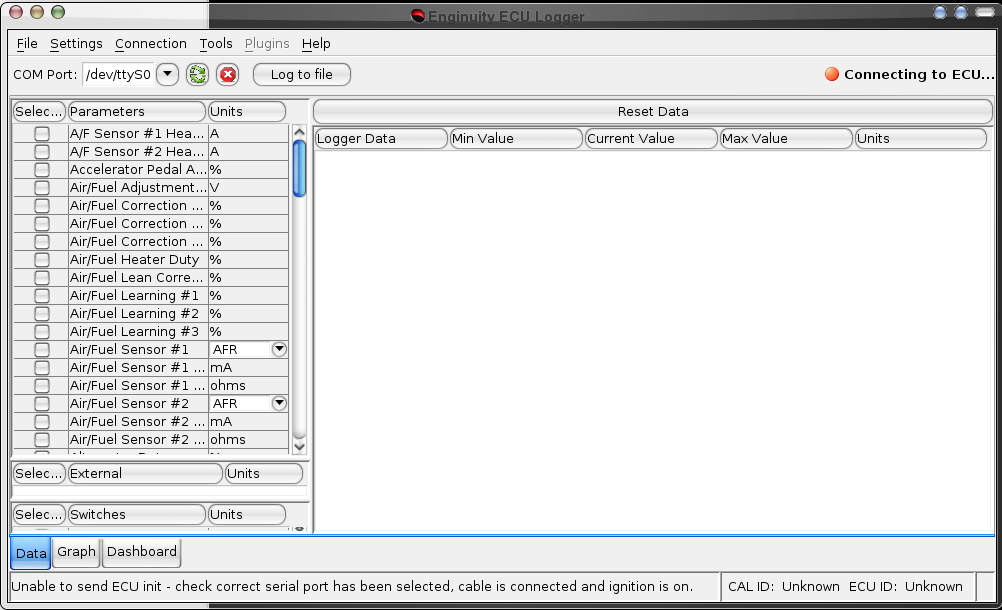
It now looks like this, just like everything else on my desktop (with a Mac OS X style widget set):
Image

Note that this doesn't work with compositing windows managers (i.e. Beryl, Compiz, Compiz fusion)...they draw a blank window when you specify the GTK swing look and feel. I had to switch to metacity, launch RomRaider, then switch back to Beryl to get that screenshot. This is a known bug: http://bugs.sun.com/bugdatabase/view_bug.do?bug_id=6429775

This is because java won't draw the window using GTK widgets until the window is first commanded to be repainted, which it never is because it is using a compositing manager. I have found coding work-arounds for this, so maybe I'll take a crack at making a special case for compositing window managers? There is a work around with Java 5 - putting the following in .bashrc, or a script that launches RomRaider, will make it use motif for drawing windows. RomRaider won't run from Java 5 (at least on my system), so this is a moot point, and motif is missing from Java 6, so this doesn't work, but here it is anyhow:

export AWT_TOOLKIT=MToolKit

So anyhow, this whole writeup doesn't help me much as I use Beryl in my car and on my home computer, but hopefully I'll be able to figure a solution for my case. But if someone uses plain old metacity, this can make things look much nicer. Thanks,

-Rich


Top
 Profile  
 
 Post subject:
PostPosted: Sun Jul 29, 2007 7:02 pm 
Offline
Newbie

Joined: Mon Jun 18, 2007 7:25 pm
Posts: 89
Well...I found out that if you install the latest build of java 6 (see http://ubuntuforums.org/showthread.php?t=262603 for some instructions on debian based systems), everything works as it should under compositing window managers. Also, at least with that build of java, everything defaults to using GTK widgets, so nothing additional is necessary to getting it looking nice. There is a small bug with the editor where all drop-down menus appear on the right hand side of the screen instead of under the menu, but this doesn't happen in the logger.


Top
 Profile  
 
 Post subject:
PostPosted: Mon Jul 30, 2007 12:14 pm 
Offline
Newbie

Joined: Wed Dec 27, 2006 5:32 pm
Posts: 27
Nice!

Works good on my java6/gentoo.
tested many metacity themes without any issues.


Top
 Profile  
 
 Post subject:
PostPosted: Tue Jul 31, 2007 12:52 am 
Offline
Newbie

Joined: Mon Jun 18, 2007 7:25 pm
Posts: 89
Glad to hear its working for ya!

I was looking through the source code, and found this in the /src/RomRaider/swing/LookAndFeelManager.java file

Code:
public static void initLookAndFeel() {
        try {
            if (isPlatform(MAC_OS_X)) {
                System.setProperty("apple.laf.useScreenMenuBar", "true");
                System.setProperty("apple.awt.rendering", "true");
                System.setProperty("apple.awt.window.position.forceSafeCreation", "true");
                System.setProperty("com.apple.mrj.application.apple.menu.about.name", "RomRaider");
                System.setProperty("apple.awt.brushMetalLook", "true");
                if (USE_RESTRICTED_PLATFORM_ON_MAC) {
                    setRestrictedPlatformLookAndFeel("Windows", "5.1");
                }
            }
            // Linux has issues with the gtk look and feel themes. If linux is detected, ignore UIManager detail.
            if (!isPlatform(LINUX)) {
                setLookAndFeel(getSystemLookAndFeelClassName());
            }

            // make sure we have nice window decorations.
            JFrame.setDefaultLookAndFeelDecorated(true);
            JDialog.setDefaultLookAndFeelDecorated(true);

        } catch (Exception ex) {
            LOGGER.error("Error loading system look and feel.", ex);
        }
    }


So I said F that because it works fine with the latest Java build. Change it to this:

Code:

public static void initLookAndFeel() {
        try {
            if (isPlatform(MAC_OS_X)) {
                System.setProperty("apple.laf.useScreenMenuBar", "true");
                System.setProperty("apple.awt.rendering", "true");
                System.setProperty("apple.awt.window.position.forceSafeCreation", "true");
                System.setProperty("com.apple.mrj.application.apple.menu.about.name", "RomRaider");
                System.setProperty("apple.awt.brushMetalLook", "true");
                if (USE_RESTRICTED_PLATFORM_ON_MAC) {
                    setRestrictedPlatformLookAndFeel("Windows", "5.1");
                }
            }
            // Linux has issues with the gtk look and feel themes. If linux is detected, ignore UIManager detail.
            // ^^F that. Works fine on my box.
            if (isPlatform(LINUX) || isPlatform (WINDOWS)) {
                setLookAndFeel(getSystemLookAndFeelClassName());
            }

            // make sure we have nice window decorations.
            JFrame.setDefaultLookAndFeelDecorated(true);
            JDialog.setDefaultLookAndFeelDecorated(true);

        } catch (Exception ex) {
            LOGGER.error("Error loading system look and feel.", ex);
        }
    }


Maybe something saved in settings.xml can eventually allow an option to override the default look on my platform of choice. I'm still picking through the code trying to figure out how things work, but if I can figure out how to read settings from settings.xml and have them apply before the GUI initializes, maybe I can add a checkbox for 'use GTK look and feel' if isPlatform.equals((LINUX)).


Top
 Profile  
 
Display posts from previous:  Sort by  
Post new topic Reply to topic  [ 4 posts ] 

All times are UTC - 5 hours [ DST ]


Who is online

Users browsing this forum: No registered users and 4 guests


You cannot post new topics in this forum
You cannot reply to topics in this forum
You cannot edit your posts in this forum
You cannot delete your posts in this forum
You cannot post attachments in this forum

Jump to:  
Powered by phpBB © 2000, 2002, 2005, 2007 phpBB Group
Style based on FI Subsilver by phpBBservice.nl