|
RomRaider
Documentation
Community
Developers
|
| Author |
Message |
|
mickeyd2005
|
Post subject: Re: Spreadsheet to import and graph log files  Posted: Posted: Tue Jul 01, 2008 6:45 pm |
|
 |
| Administrator |
 |
Joined: Wed Oct 25, 2006 12:32 am
Posts: 3040
|
Some people prefer to see the total timing as a 3D surface chart. Just right click on the total timing chart and select Chart Type. Then pick on 3D surface. To adjust the 3D surface, right click it again and select 3-D_View... a control box to rotate it will come up. 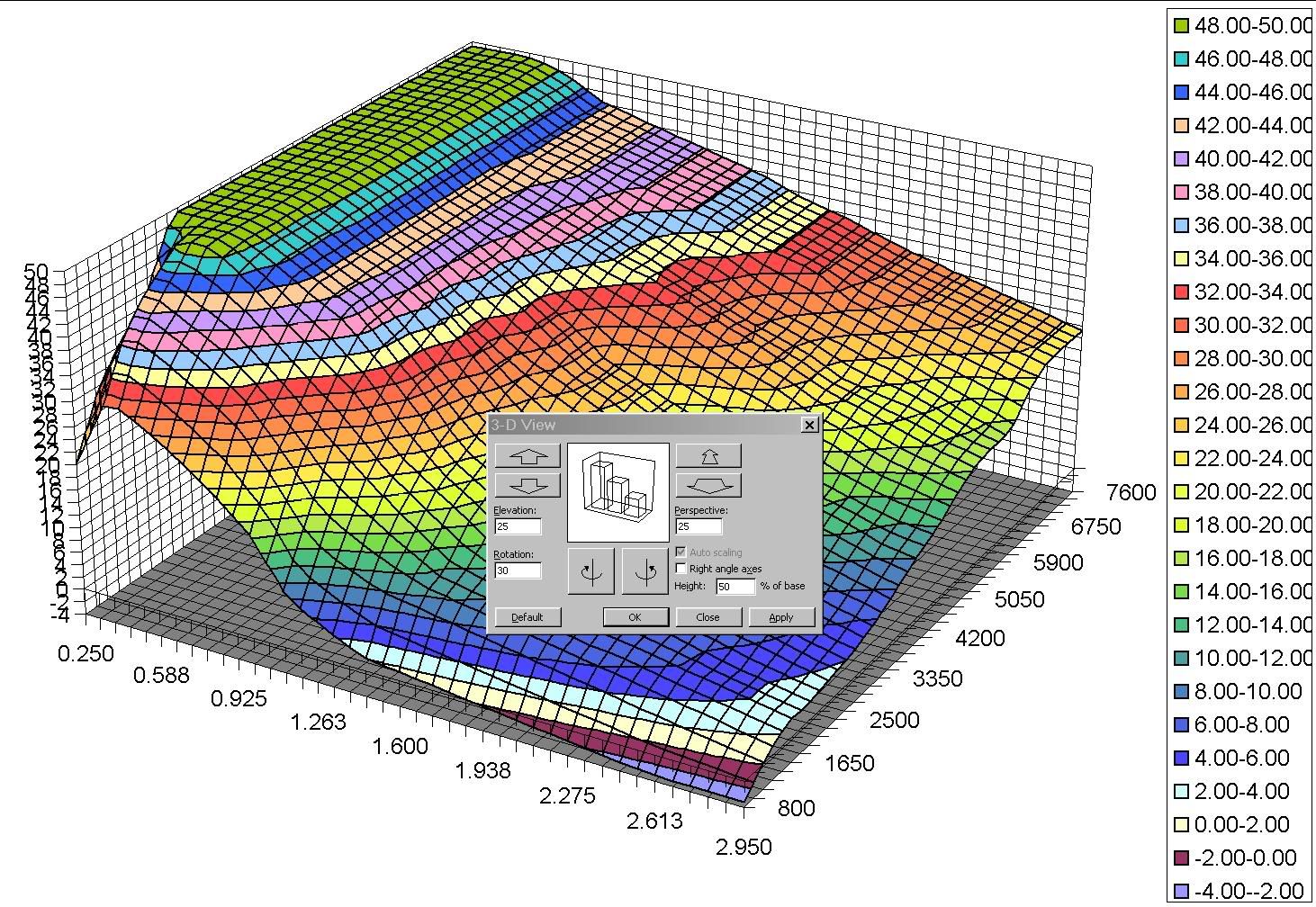
|
|
| Top |
|
 |
|
sega
|
Post subject: Re: Spreadsheet to import and graph log files Posted: Mon Jul 14, 2008 4:57 am |
|
|
| Experienced |
Joined: Wed Jun 18, 2008 7:46 am
Posts: 106
|
|
I did a road dyno yesterday and calculated the data with this spreadsheet.
The graphic looks reasonable on my whp but the torgue behavior looks not normal.
I did try to pickup the 3rd gear's data from my csv but it failed.
One small question here : do I need to push pedal full throttle at 3rd gear within 2000rpm~6000rpm?
Or just push it smoothly is enough?
|
|
| Top |
|
|
|
enthusiast
|
Post subject: Re: Spreadsheet to import and graph log files Posted: Wed Jul 16, 2008 12:49 am |
|
|
| RomRaider Donator |
 |
Joined: Sat Mar 03, 2007 5:58 pm
Posts: 98
|
|
| Top |
|
|
|
wheelerjb
|
Post subject: Re: Spreadsheet to import and graph log files Posted: Sun Jul 27, 2008 2:58 pm |
|
|
| Newbie |
Joined: Wed Jul 25, 2007 7:59 pm
Posts: 95
Location: 02 2.5 WRX, Houston, A4SGE01C
|
|
This is a great spreadsheet, so thanks for al the effort that went into it.
what target AFR for CL is beign used with that timing graph above?
|
|
| Top |
|
|
|
pikachu
|
Post subject: Re: Spreadsheet to import and graph log files Posted: Sun Aug 03, 2008 1:07 pm |
|
|
| Newbie |
 |
Joined: Sat Feb 16, 2008 11:08 am
Posts: 73
|
I'm trying out the dyno feature in airboy's spreadsheet..here are the dyno graphs that i got: 20080803: 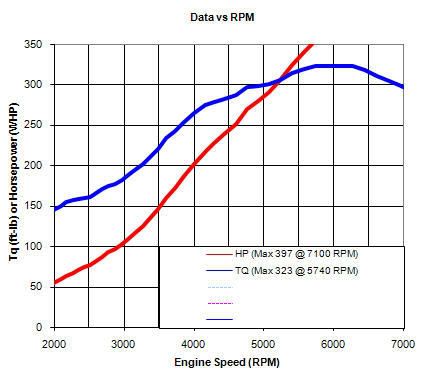 20080727 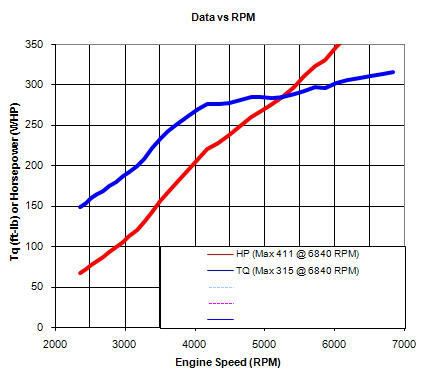 The numbers look too high for my car and the graphs don't look like a typical dyno graph... where it the HP looks like a inverted U.. am I doing something wrong? I've attached my logs and spreadsheets.
| Attachments: |
 dyno.zip [1.03 MiB]
Downloaded 134 times
|
|
|
| Top |
|
|
|
Airboy
|
Post subject: Re: Spreadsheet to import and graph log files Posted: Mon Aug 04, 2008 2:33 am |
|
|
| RomRaider Donator |
Joined: Wed Aug 02, 2006 9:40 pm
Posts: 1067
Location: Calgary
|
|
You need to use the proper gearing information. The spreadsheet default numbers are for 3rd gear, USDM 5MT. Scroll over to the right and you'll see the table where you can alter/update the info.
|
|
| Top |
|
|
|
Airboy
|
Post subject: Re: Spreadsheet to import and graph log files Posted: Fri Oct 17, 2008 3:14 am |
|
|
| RomRaider Donator |
Joined: Wed Aug 02, 2006 9:40 pm
Posts: 1067
Location: Calgary
|
bump for updated file on first page. Hope I didn't "break" anything 
|
|
| Top |
|
|
|
Bullwinkle1983
|
Post subject: Re: Spreadsheet to import and graph log files Posted: Fri Oct 17, 2008 5:11 pm |
|
|
| Experienced |
 |
Joined: Sat Dec 16, 2006 1:59 pm
Posts: 197
|
Airboy wrote: bump for updated file on first page. Hope I didn't "break" anything Very nice. Looks much cleaner. Thanks again for your great work, this spreadsheet is invaluable for tuning!
_________________
aka:
-Nate
|
|
| Top |
|
|
|
gabedude
|
Post subject: Re: Spreadsheet to import and graph log files Posted: Sat Oct 18, 2008 2:51 am |
|
|
| RomRaider Developer |
 |
Joined: Tue Jan 23, 2007 5:11 pm
Posts: 966
Location: Hillsboro, Oregon
|
Great job as always! 
|
|
| Top |
|
|
|
spatuality
|
Post subject: Re: Spreadsheet to import and graph log files Posted: Sat Oct 18, 2008 9:06 am |
|
|
| Newbie |
Joined: Thu Mar 27, 2008 9:50 am
Posts: 47
|
|
I need to reduce timing in one cell on the stage 1 rev3 map for my car, and figured I could use this spreadsheet to interpolate the timing in surrounding cells.
As a test I figured I should see what the interpolation would do to original LGT stage 1 ver3 base timing map, and it changes it completely. I must be doing something wrong, though admittedly the new interpolation appears slightly smoother than the original. Here's what I'm doing:
RomRaider 0.5.1brc2 (I'll upgrade this). Base Timing. Copy Table.
Log file interpolation ver4p0j public.xls. Base timing. Paste starting at cell A39. Align and Move Copied table.
Rescale Load. Accept defaults. Watch most timing change.
Rescale RPM. Accept defaults. Watch most timing change (again).
WTF?
Brian
|
|
| Top |
|
|
|
mickeyd2005
|
Post subject: Re: Spreadsheet to import and graph log files Posted: Sat Oct 18, 2008 10:36 am |
|
|
| Administrator |
|
Joined: Wed Oct 25, 2006 12:32 am
Posts: 3040
|
|
You should not have to rescale the load.
Just type in a new number in the area where there is knock or use the up and down arrrows.
Rescaling is if you put a new turbo in and you start hitting new load levels.
|
|
| Top |
|
|
|
spatuality
|
Post subject: Re: Spreadsheet to import and graph log files Posted: Sat Oct 18, 2008 11:43 am |
|
|
| Newbie |
Joined: Thu Mar 27, 2008 9:50 am
Posts: 47
|
Okay, thats much simpler to just change the value in romraider  Question though: why did you interpolate the cells around the high rpm / high load knock between the lgt stage 1 original map and rev 3? Whats the process for that? Brian
|
|
| Top |
|
|
|
mickeyd2005
|
Post subject: Re: Spreadsheet to import and graph log files Posted: Sat Oct 18, 2008 11:46 am |
|
|
| Administrator |
|
Joined: Wed Oct 25, 2006 12:32 am
Posts: 3040
|
|
I did it by hand. I clicked twice (0.70 degrees) for the cells where the knock occurred and then eyeballed the smoothness and then clicked once on the cells near it that seemed to need it.
|
|
| Top |
|
|
|
330
|
Post subject: Re: Spreadsheet to import and graph log files Posted: Sun Oct 19, 2008 6:04 pm |
|
|
| Newbie |
Joined: Mon Jul 21, 2008 11:19 am
Posts: 30
|
|
Hi! I import log in spreadsheet and I see complete nonsense, all columns confusion. How can I fix this?
|
|
| Top |
|
|
|
gto7419
|
Post subject: Re: Spreadsheet to import and graph log files Posted: Sat Nov 01, 2008 3:31 pm |
|
|
| Newbie |
Joined: Sat Apr 26, 2008 3:57 pm
Posts: 39
|
|
First, I would like to thank you for this tremendous contribution to the open source tuning community!
Unfortunately, after playing around with the spreadsheet and figuring out how most of it works, Im having a few problems...
Why when I try to interpolate the afr data, does it mark all the cells in the first two columns and plot only those two load columns onto the chart?
Im having a similar problem with timing "mark anchor cells" - it only marks/plots the first two loads or columns. It marks all the cells in the two columns then plots that...
Lastly, how do I change the gear selection on the "accel" page?
Thanks again!!!
|
|
| Top |
|
|
Who is online |
Users browsing this forum: No registered users and 1 guest |
|
You cannot post new topics in this forum
You cannot reply to topics in this forum
You cannot edit your posts in this forum
You cannot delete your posts in this forum
You cannot post attachments in this forum
|
|


