|
RomRaider
Documentation
Community
Developers
|
| Author |
Message |
|
merchgod
|
Post subject: UTILITY: Learning View (version 0.6a 03-21-09)  Posted: Posted: Thu Feb 14, 2008 4:29 pm |
|
 |
| RomRaider Donator |
 |
Joined: Thu Mar 30, 2006 2:38 am
Posts: 5336
|
Learning View is a tool I created to display specific knock and a/f learning parameters stored by the Subaru ECU. This is a standalone Windows application that does not require any other software to run. Running Learning View with a compatible cable (such as the Tactrix OpenPort) along with a supported Subaru, allows for the reading of these learned parameters and displays them in an easy to analyze format. Attachment:
 LV_0.6a_.jpg [ 117.47 KiB | Viewed 167489 times ]
Learning View reads and displays the following:- Reads the entire fine learning knock correction (FLKC) table from RAM and displays it as a 3D table. The FLKC table is used by the ECU to make fine corrections to timing across specific load and rpm ranges based on knock events under certain conditions. Details about how the FLKC table fits into Subaru's knock control strategy can be found HERE.
- Reads and displays the FLKC load and RPM ranges currently flashed to the ECU (modified to show how the range is used/determined). These ranges make up the axes of the FLKC table and determine how the FLKC is applied as well as determined.
- Reads the four A/F Learning #1 stored corrections (A-D) from RAM (and A/F learning #2 for H6 models) and displays them as a 2D table. These are the long-term fuel trims based on feedback from the front O2 sensor in closed loop and are applied in both closed loop and open loop. Positive values indicate the percentage of fuel added, while negative values indicate the percentage of fuel removed.
- Reads and displays the A/F airflow ranges currently flashed to the ECU (modified to show how the range is used/determined). These values make up the axis of the A/F Learning #1 (and #2 for H6 models) table and determine at what airflow the long-term fuel trims are applied (in closed loop and open loop) as well as determined (in closed loop only).
- Displays the current ignition advance multiplier (IAM). The IAM is used by the ECU to determine the amount of advance to add to base timing. Details about how the IAM fits into Subaru's knock control strategy can be found HERE.
- Displays the ECU ID, ROM ID, transmission and ECU description. NOTE: The ROM ID, transmission and ECU description are determined based on the ECU ID and are not directly read from the ECU.
- Displays the temporary and memorized diagnostic trouble codes (i.e. CEL codes). This feature is in early testing.
Function descriptions:- Save - Saves all current data as a .csv file in the same directory as the Learning View application. This type of file can be opened by most spreadsheet applications.
- Copy - Copies current Learning View data to clipboard and formats it so it can be posted in a forum. Hit Ctrl-V to paste the data in a forum post or to paste into a text editor such as notepad. Learning View will automatically add the [ code ] tags for proper formatting with most forum software.
- Screenshot - Takes a screenshot of Learning View and saves it as a jpeg file in the same directory as the Learning View application.
- Comm Log - Allows you to view the connection log (useful if there are issues with the connection or reading).
- Reset ECU - Sends a request to the ECU to perform a reset. This clears the ECU's RAM and therefore all learned parameters, DTCs, etc.
- Port - This dropdown box allows you to select the correct COM port used by your cable. Hit the refresh icon to refresh the port list if you attach your cable after starting Learning View. Learning View will automatically select the port used during the last successful connection if it is available when starting the application or when hitting the COM port refresh icon. Note: Port selection is not necessary if you are using the OpenPort 2.0 cable.
How to use Learning View:- Learning View, which is written in vb.net, is only compatible with Windows operating systems.
- Make sure you have .net 2.0 installed (download HERE). You can also use Windows update to install .net 2.0.
- Download the Learning View zip archive from the bottom of this post. Unzip Learning View.exe, which can be placed anywhere on your system.
- Connect your cable to your laptop's USB port and the car's OBD-II port. Learning View has been designed to work with the Tactrix OpenPort cables (including the latest 2.0 version), although it may also work with some other OBD-II cables (make sure you install the proper drivers). For OpenPort cables, install the latest version of EcuFlash to install the cable's drivers.
- Any software which makes use of your cable, such as EcuFlash, RomRaider or other logging software, must be closed before attempting to connect with Learning View.
- Run Learning View - you can run it from anywhere. It does NOT require any other software or files to run.
- Make sure you car is NOT in test mode. Test mode, which consists of connecting the green test mode connectors under the dash, should only be used when reading/flashing with Ecuflash. If used when running Learning View, the IAM and the DTC reader will not be correct as it relates to normal operation.
- Turn your car's ignition to on (just like logging -> engine does NOT have to be running).
- Select the correct COM port from the drop down box (hit refresh ports if you attached the cable after starting the app). Learning View will remember and select the last COM port used during a successful connection if available when starting the application or refreshing the port list via the com port button. Note: Port selection is not necessary for the OpenPort 2.0.
- Hit "Connect" (data will only update each time you hit this button, not real-time).
Supported ECUs:Learning View supports 260 different Subaru ECU revisions including those listed HERE (except for NA ROMs E2ZD508C, E2ZD308E, E2VG212E, and E2TB101Q). In addition, some additional ECUs were added in the last release (0.4a) that are not listed, based on user submissions up to that point in October of 2008. Known issues:- Some early 32-bit ECUs (typically those ROMs 512kb in size) do not allow for reading portions of the ROM via SSM. This impacts the A/F Learning airflow ranges and the FLKC load and RPM ranges in Learning View. When Learning View detects this, it will look for a tune.hex ROM file in the same directory as the application and extract the airflow, RPM and load ranges data from this ROM (as long as the ROM id matches the ECU it's connected to). Therefore, if your ECU is impacted, simply place your latest tuned ROM file (that matches the ROM flashed to the ECU) in the same directory as Learning View and rename it tune.hex. If tune.hex is not found, Learning View will load known factory values for the airflow, load and RPM for your particular ECU. An asterisk at the end of an axis value indicates it was retrieved using one of the above methods and not directly from the ECU (which method is used will appear in the description for each table).
Change List version 0.6a (released Mar. 21st, 2009)- New SSM diagnostic trouble code reader (i.e. CEL codes). Learning View will read both temporary and memorized codes. Temporary codes are current faults which are cleared when turning the ignition from off to on (although may be set again if the fault still exists). Memorized codes are based on code history and are more "permanent" than temporary codes. This feature is in early testing.
- Fixed a connection issue related to the OpenPort 2.0 and Vista 64bit.
Please do not host Learning View on your own site or upload it to another site. Instead, provide a link to this post only.
|
|
| Top |
|
 |
|
Airboy
|
Post subject: Re: Learning View Tool Posted: Thu Feb 14, 2008 4:32 pm |
|
|
| RomRaider Donator |
Joined: Thu Aug 03, 2006 1:40 am
Posts: 1067
Location: Calgary
|
|
Cool. I'll try it out with my older Tactrix cable. How do I tell which version of the cable I have anyways?
|
|
| Top |
|
|
|
dwmoss
|
Post subject: Re: Learning View Tool Posted: Thu Feb 14, 2008 4:38 pm |
|
|
| Newbie |
Joined: Tue May 02, 2006 4:02 pm
Posts: 96
Location: NE PA
|
Airboy wrote: How do I tell which version of the cable I have anyways? Same question here.... I'll give it a try with my cable. Thanks for the program! dm
|
|
| Top |
|
|
|
merchgod
|
Post subject: Re: Learning View Tool Posted: Thu Feb 14, 2008 4:42 pm |
|
|
| RomRaider Donator |
|
Joined: Thu Mar 30, 2006 2:38 am
Posts: 5336
|
|
under ports in device manager
|
|
| Top |
|
|
|
Bullwinkle1983
|
Post subject: Re: Learning View Tool Posted: Thu Feb 14, 2008 5:04 pm |
|
|
| Experienced |
 |
Joined: Sat Dec 16, 2006 5:59 pm
Posts: 197
|
|
Cool! Very good idea and very useful tool, Merc. I'll give it a shot and report back.
_________________
aka:
-Nate
|
|
| Top |
|
|
|
Jon [in CT]
|
Post subject: Re: Learning View Tool Posted: Thu Feb 14, 2008 7:03 pm |
|
|
| Experienced |
Joined: Wed Jul 26, 2006 7:19 pm
Posts: 650
Location: Connecticut, USA
|
|
I'm guessing this needs to be installed in the same directory which contains the RomRaider XML definition files for both the ROM editor and the logger?
|
|
| Top |
|
|
|
merchgod
|
Post subject: Re: Learning View Tool Posted: Thu Feb 14, 2008 7:12 pm |
|
|
| RomRaider Donator |
|
Joined: Thu Mar 30, 2006 2:38 am
Posts: 5336
|
Jon [in CT] wrote: I'm guessing this needs to be installed in the same directory which contains the RomRaider XML definition files for both the ROM editor and the logger? No, this is completely standalone app. Works reqardless of whether you have RomRaider installed or not.
|
|
| Top |
|
|
|
Hurricane123
|
Post subject: Re: Learning View Tool Posted: Thu Feb 14, 2008 7:29 pm |
|
|
| Experienced |
 |
Joined: Tue Aug 15, 2006 11:40 pm
Posts: 170
Location: Calgary
|
Works great with Tactrix 1.2. 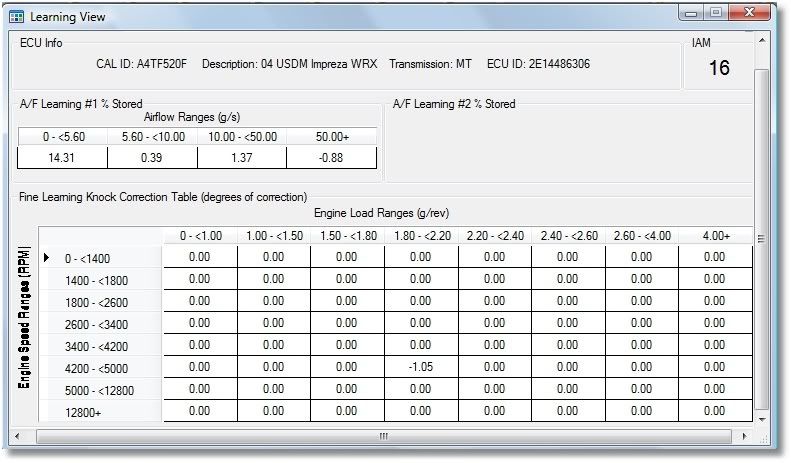 Great work again Merchgod!! Jeff *Edit* I have already changed the ranges to be more useful at the top end of each scale ...
_________________
'04 WRX, v7 EJ207, VF30
"Genius has its limits, but stupidity is boundless"
|
|
| Top |
|
|
|
merchgod
|
Post subject: Re: Learning View Tool Posted: Thu Feb 14, 2008 7:45 pm |
|
|
| RomRaider Donator |
|
Joined: Thu Mar 30, 2006 2:38 am
Posts: 5336
|
Hurricane123 wrote: Works great with Tactrix 1.2. Cool. Thanks.
|
|
| Top |
|
|
|
Hurricane123
|
Post subject: Re: Learning View Tool Posted: Thu Feb 14, 2008 7:49 pm |
|
|
| Experienced |
|
Joined: Tue Aug 15, 2006 11:40 pm
Posts: 170
Location: Calgary
|
Airboy wrote: Cool. I'll try it out with my older Tactrix cable. How do I tell which version of the cable I have anyways? Beat ya to it Sunny!  Jeff
_________________
'04 WRX, v7 EJ207, VF30
"Genius has its limits, but stupidity is boundless"
|
|
| Top |
|
|
|
mickeyd2005
|
Post subject: Re: Learning View Tool Posted: Thu Feb 14, 2008 8:02 pm |
|
|
| Administrator |
 |
Joined: Wed Oct 25, 2006 4:32 am
Posts: 3040
|
|
Awesome, I can't wait to try it tonight.
|
|
| Top |
|
|
|
testes1010
|
Post subject: Re: Learning View Tool Posted: Thu Feb 14, 2008 10:01 pm |
|
|
| Experienced |
Joined: Wed Mar 29, 2006 2:04 pm
Posts: 414
Location: Henderson, KY
|
mickeyd2005 wrote: Awesome, I can't wait to try it tonight. +1....well, maybe not tonight but once I get the car back together.
_________________
1988 Celica Alltrac - stockish
2005 LGT 5MT 315whp/340wtq -sold
2003 WRX 5MT 371whp/355wtq -sold
|
|
| Top |
|
|
|
LGT-3-6
|
Post subject: Re: Learning View Tool Posted: Fri Feb 15, 2008 6:51 am |
|
|
| Experienced |
Joined: Thu May 25, 2006 12:11 am
Posts: 205
|
|
Seems I should remove some timing.. But from where? Seems pretty random.
| Attachments: |

fbkc.PNG [ 27.42 KiB | Viewed 166122 times ]
|
_________________
05 LGT TMIC/DP/Perrin Y/Stock exhaust cans
|
|
| Top |
|
|
|
nsfw
|
Post subject: Re: Learning View Tool Posted: Fri Feb 15, 2008 7:25 am |
|
|
| Moderator |
Joined: Thu Nov 23, 2006 2:23 am
Posts: 2565
|
_________________
2005 Legacy GT w/ ATP 3076, IWG, MBC, BCS, BC 272, LC, FFS, OMG
Please don't send questions via PM. Post a thread and send me a link to it instead. Thanks!
Last edited by nsfw on Tue Sep 29, 2009 6:45 am, edited 2 times in total.
|
|
| Top |
|
|
|
ride5000
|
Post subject: Re: Learning View Tool Posted: Fri Feb 15, 2008 2:29 pm |
|
|
| Senior Member |
Joined: Thu Aug 03, 2006 2:40 pm
Posts: 1934
|
cool beans! nice work bill. 
|
|
| Top |
|
|
Who is online |
Users browsing this forum: No registered users and 6 guests |
|
You cannot post new topics in this forum
You cannot reply to topics in this forum
You cannot edit your posts in this forum
You cannot delete your posts in this forum
You cannot post attachments in this forum
|
|


