|
RomRaider
Documentation
Community
Developers
|
 
|
Page 1 of 1
|
[ 8 posts ] |
|
| Author |
Message |
|
jon7009
|
Post subject: SUBARU and MEGALOGVIEWER TUTORIAL  Posted: Posted: Wed Dec 18, 2019 3:59 am |
|
 |
| Senior Member |
Joined: Thu Dec 18, 2014 10:31 pm
Posts: 1529
Location: oregon
|
SUBARU and MEGALOGVIEWER Megalogviewer? What's that? Software to analyze, and extrapolate data and table values from logged data. It can do all sorts of things, but I mainly use it to calculate changes for tables like VE, enrichment, or timing adjustments from knock corrections. If you're smart enough with logging and calculations, you could use this software to form a tune from logged data, or adjust data in current tables for error or corrections. TO GET STARTED: To open a log file, go to the tab marked File and then select Open. This gets you a menu box like file explorer, where you can select one or multiple files. Hold Ctrl and left click mouse on each individual file you want to open together, or press Ctrl+A to get all the logs in that folder, or other shortcuts work. One of the most common questions I get when talking about this with people, is their concerns over sending me so many files, and how I might have a hard time sorting them. uh, not really. If I'm looking for idle data, I can filter out not-idle conditions, and I can filter out coolant temps for cold starts or for looking at heat soak, etc. hey, that's neat, but before you get too far in, let's back it up some and begin a process that will make things easier in the long run. Working between different logging software for Subaru applications, it became apparent that there should be some sort of standard between terms, otherwise each logging software that has differently named terms for the same logging parameters would need their own custom fields and filters, meaning if you made a certain number of calculated fields and filters for one logging platform, you now have to increase your custom things by that much for each other logging platform. This gets tedious. Enter: " Field Name Standardization" Problem: Logs from the AP for Cobb use punctuation that isn't compatible with filters, or custom fields. Solution: Add the Cobb term to a standardized term Example: Man. Abs. Press. (psi) - add the Imported Log Name "Man. Abs. Press." (without quotes) to the standardized field name for MAP Result: the Cobb term loads up and is viewed as MAP under field names In conclusion: If you take the time to add each different logger field name to a standardized name, you can severely reduce the number and names of custom tables, and filters that you would need between all the different logger software. A/F Learning #1 could be LTFT, A/F Correction #1 could be STFT, etc. To add: When you download and go to use this software, there are already some terms from different software that are bundled into some standardized terms. For instance, "Engine Speed". It's already set up for to show as RPM. LINKS: MLV from EFIanalyticshttps://www.efianalytics.com/MegaLogViewer/Examples / explanations care of Andy Whittlehttps://www.youtube.com/watch?v=CG_kY3K_2AEhttps://www.youtube.com/watch?v=yPzfu6VHKfwhttps://www.youtube.com/watch?v=lT-ZAooUJxU
| Attachments: |

fieldname.png [ 125.23 KiB | Viewed 8279 times ]
|

fieldname2.png [ 151.7 KiB | Viewed 8279 times ]
|
_________________
if you're generous, feel free to donate.
venmo @ jon7009, 1047 when asked
jedilley@gmail.com for paypal
Last edited by jon7009 on Wed Dec 18, 2019 7:50 am, edited 3 times in total.
|
|
| Top |
|
 |
|
jon7009
|
Post subject: SUBARU and MEGALOGVIEWER: CUSTOM FIELDS Posted: Wed Dec 18, 2019 4:00 am |
|
|
| Senior Member |
Joined: Thu Dec 18, 2014 10:31 pm
Posts: 1529
Location: oregon
|
|
Custom fields? Okay!
Say you've been logging calculated engine load, and you also have engine speed, but you don't have calculated Mass Air Flow.
So you create a custom field, which could be named something generic like MAF or Calculated MAF or MAF Calculated and use the logged parameters RPM and Engine Load to calculate Mass air flow.
Why? Because mass of air per revolution can easily be converted to mass of air per second. you have RPM, so divide that by sixty. now multiply that against engine load.
If you can figure out the algebra behind different calculated parameters, you can create custom fields for them.
Hey, what's total fuel correction from fuel trims?
(percent / 100) + 1 = factor
( -2% / 100) = -0.02
(-0.02) + 1 = 0.98 factor
so if you have -2% fuel correction, you fueling adjustment factor would be 0.98 for the time you're looking at that fueling adjustment.
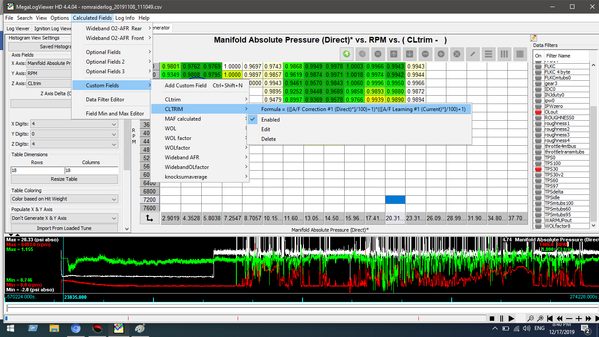
so how are short term and long term to be calculated together? This is one of my actual examples, as copied from the custom field editor. You take the factor of each fuel correction type and multiply them.
(([A/F Correction #1]/100)+1)*(([A/F Learning #1]/100)+1)
STFT + LTFT is not like -2% plus +2% is 0%. It doesn't work that way! It's factor times factor. Technically LTFT comes first, but in math, you don't need to care which one comes first.
and thus when we select say a third axis for CLtrim (the term I used for this custom field) It'll show the total correction factor in the cell data from fuel trims. This is great for the closed loop portions of MAF tables and VE tables.
Another example would be open loop fueling error.
We could call this OLerror or WOLfactor or whatever you are going to remember and makes sense for you.
Simply, this would be Fueling Final Base AFR / Wideband AFR (or FFB lambda / WB lambda, etc.)
If you're logging wideband through an unused input like TGV left (or right) like I am, you will need to account for some delay, more-so if the sensor is in the midpipe.
to find the amount of delay between wideband and fueling request, do a stab to WOT and hold it for a few hundred RPM and immediately let off. Do this a couple times and look at when FFB changes drastically, and when the wideband parameter shows a relative response to FFB change. Generally this is going to be 170ms to 400ms, and some of this is also dependent on RPM / exhaust velocity / engine load, so you might pick your chosen latency time based off airflow ranges that wouldn't be in closed loop.
Look at your log's timestamp to figure out how many lines on average you would need to be considered accurate delay for wideband compared to fueling request.
depending on logging speed and sensor distance from turbo, this might look like 3 to 6 lines. this custom field could look like:
[Final Fueling Base] / [Wideband+3]
and would show a correction factor for whichever cells that the data is present for in your histogram (after filters are applied)
| Attachments: |
File comment: with filter for removing data that is open loop
and anything more than 30% TPS

CLtrim.png [ 171.06 KiB | Viewed 8259 times ]
|
CLtrim2.png [ 165.16 KiB | Viewed 8259 times ]
|
_________________
if you're generous, feel free to donate.
venmo @ jon7009, 1047 when asked
jedilley@gmail.com for paypal
Last edited by jon7009 on Wed Dec 18, 2019 4:44 am, edited 1 time in total.
|
|
| Top |
|
|
|
jon7009
|
Post subject: SUBARU and MEGALOGVIEWER: HISTOGRAMS Posted: Wed Dec 18, 2019 4:03 am |
|
|
| Senior Member |
Joined: Thu Dec 18, 2014 10:31 pm
Posts: 1529
Location: oregon
|
|
When you start MLV for the first time, I don't remember what comes up once you move over to the histograms tab, but go ahead and figure out what table you think you'd like to make.
The trick here is that you NEED to have two different axis with at least one value in each axis. This won't apply to if you're trying to make timing or fueling adjustments for 3D tables like base timing, KCA/KCR or VE.
This would apply to tables that don't have a y-axis value.
Say we were going to take a stab at primary enrichment (Warmup enrichment, which main table is always active) which appears as a 2D table, with cell values for one axis, which is engine coolant temp.
We could use CL/OL Status, and set the y axis rows to 2 or 3, and have 8, 10 or 7, 8, 10 as the y axis values.
Of course data gets split up this way, but you can copy / paste and manipulate data in excel right?
another example would be the MAF scale.
Going back to 3D table examples, go ahead and set your rows and columns amounts, and then set your x-axis and y-axis value types, and then go down to ensure that auto-generate is happening. This will auto-populate based off your min/max values logged.
Then you can set the third axis or leave it blank for now, and if you have the dimensions of both axis looking correct (say 16x16 or 18x18 cells) then go ahead and Save View As... and give it a name.
If you used Standardized Field names in your axis types, then the saved view will work between whichever different logger software has been added to standardized field names.
if you used field names that are specific to one log and aren't added to Standardized Field names, then if you load another logger type that has differently named parameters for the same thing, then those axis won't populate on the left side, and you'll have to select them manually when you load that specific histogram view.
Once you've saved the table that has been generated, go ahead and close Megalogviewer and re-open it.
Then re-open whichever log you were working with.
Now the fun part:
make sure auto-generate x & y axis is turned off in the lower left portion of the histograms tab
begin to edit each cell of each axis for their respective values that you need to replicate your given table
once you're done, Save View As... and name this new table a new name or exactly the same as the view your already made - which would replace it.
enjoy
| Attachments: |

histogram1.PNG [ 152.93 KiB | Viewed 8245 times ]
|
_________________
if you're generous, feel free to donate.
venmo @ jon7009, 1047 when asked
jedilley@gmail.com for paypal
Last edited by jon7009 on Wed Dec 18, 2019 6:46 am, edited 2 times in total.
|
|
| Top |
|
|
|
jon7009
|
Post subject: SUBARU and MEGALOGVIEWER: FILTERS Posted: Wed Dec 18, 2019 4:03 am |
|
|
| Senior Member |
Joined: Thu Dec 18, 2014 10:31 pm
Posts: 1529
Location: oregon
|
|
This is super simple. If the condition is true, lines of logged data with that condition being true, are removed.
so a switch named TPS30 might have a field that looks like TPS > 30
if TPS is more than 30, the data from that line gets taken out of the data available for your histogram.
You can use custom fields here too - but the switches for filters only work if the field name used in the calculation is available in the log.
if you have a filter for when injector pulse width is zero, and you didn't log that parameter, you won't get a response from clicking on that filter. it'll turn red momentarily because you clicked on it, but it won't edit the data (or in some cases, it will crash) and won't remain red (active).
Another option might be:
ECT < 176 && ECT > 200
where any data with ECT less than 176 or more than 200 is excluded. or rather, only data between 176 to 200 would be included.
| Attachments: |
File comment: this is what it might look like if you didn't use standard field naming

filters2.png [ 140.73 KiB | Viewed 8254 times ]
|
_________________
if you're generous, feel free to donate.
venmo @ jon7009, 1047 when asked
jedilley@gmail.com for paypal
|
|
| Top |
|
|
|
welaish
|
Post subject: Re: SUBARU and MEGALOGVIEWER TUTORIAL Posted: Wed Dec 18, 2019 6:51 am |
|
|
| RomRaider Donator |
Joined: Tue Apr 29, 2014 4:48 am
Posts: 946
|
|
great job! thanks for informative. I can see the tables are in the opposite direction, is it possible to change that?
_________________
RomRaid!
|
|
| Top |
|
|
|
jon7009
|
Post subject: Re: SUBARU and MEGALOGVIEWER TUTORIAL Posted: Wed Dec 18, 2019 7:05 am |
|
|
| Senior Member |
Joined: Thu Dec 18, 2014 10:31 pm
Posts: 1529
Location: oregon
|
|
yeah, you can set either direction the way you want.
if you wanted the y-axis to be pressure and the x-axis to be engine speed, then you'd select those for their respective axis and edit the axis cell values individually (or rely on the auto-generate x & y axis feature, and THEN edit the axis values)
so in this instance, I took my 18x18 VE table which had MAP as the x-axis and RPM as the y-axis, and moved the axis types around, and then set the table to auto-generate x-y axis, and then set the z-axis to feedback knock correction.
with FBKC, you'll see the average of all the data for a given cell, when what we want to see is only when it isn't zero. so make a filter for FBKC = 0 and bam. now you see an average of feedback knock for a given cell, with FBKC = 0 being excluded.
| Attachments: |
File comment: an example of swapped axis that shows no logged feedback knock from simple data filter

tablechange.png [ 127.57 KiB | Viewed 8242 times ]
|
_________________
if you're generous, feel free to donate.
venmo @ jon7009, 1047 when asked
jedilley@gmail.com for paypal
|
|
| Top |
|
|
|
Brumblez
|
Post subject: Re: SUBARU and MEGALOGVIEWER TUTORIAL Posted: Wed Dec 18, 2019 4:47 pm |
|
|
| Newbie |
Joined: Thu Jun 14, 2018 1:15 pm
Posts: 9
|
|
Absolutely love this software. Great write up for people who haven't used it yet and would like to start to.
|
|
| Top |
|
|
|
norwn
|
Post subject: Re: SUBARU and MEGALOGVIEWER TUTORIAL Posted: Thu Dec 01, 2022 11:22 am |
|
|
| Newbie |
Joined: Wed Nov 23, 2011 10:57 pm
Posts: 5
|
|
Totally agree, very nice help to start for Subaru folks to use this tool. Thanks Jon.
Do you guys have best practices for the two new slider settings, to help populate the table generator correctly:
Minimum Individual Hit Weight - 0.00 to 1.0, to compensate for cell center/edge hits
Minimum Total Hit Weight - 0.00 to 2500, related to how many total hits for a cell
|
|
| Top |
|
|
|
|
Page 1 of 1
|
[ 8 posts ] |
|
Who is online |
Users browsing this forum: No registered users and 3 guests |
|
You cannot post new topics in this forum
You cannot reply to topics in this forum
You cannot edit your posts in this forum
You cannot delete your posts in this forum
You cannot post attachments in this forum
|
|


