|
RomRaider
Documentation
Community
Developers
|
| Author |
Message |
|
Suba Imp
|
Post subject: Re: SH Boot Mode How-to  Posted: Posted: Fri May 07, 2021 12:46 am |
|
 |
| RomRaider Donator |
 |
Joined: Fri Sep 18, 2020 1:06 am
Posts: 100
|
|
22611AN2451 is your ECU part number. It should be the same as the picture on page three. Also you can use any ground on the board for that extra ground. P413 still needs to be grounded. Use CN402 which is on top of the board, Also on page 3 Sasha gives you the pinout of CN402. You got this!!
_________________
God First
2010 Subaru Impreza 2.5i NA MT Premium Second
-Hybrid Intake
-0.002 milled heads
-Ported and polished heads.
-Invidia N1 Cat back
-Grounding Kit
|
|
| Top |
|
 |
|
aaa
|
Post subject: Re: SH Boot Mode How-to Posted: Fri May 07, 2021 4:00 am |
|
|
| Newbie |
Joined: Thu Apr 22, 2021 1:57 am
Posts: 28
|
|
Thanks for the encouragement Suba Imp! I'm kicking myself for turning the ignition off, I totally forgot not to do that. I might have been able to reflash when it was still connected. I think I tried test writing which failed, but I might have reset the ignition first, because I was trying to go step by step.
Anyway, thanks for the CN402 tip! I read his pinout a couple of times wondering what it was from. Much cleaner to solder to. So if I'm reading this right, this is how CN402 pins translate?:
1 PVcc2 = (probably already powered by the harness voltage)
3 Watchdog (PB15?) = P407
4 Reset
6 FWE = P405
8 MD1 = P413 (I'm looking at the shbootmode.pdf schematic) ground
9 TxD1 = P409
10 RxD1 = P411
11 Gnd = (tie into MD1 ground?)
12 Gnd = (tie into MD1 ground?)
|
|
| Top |
|
|
|
Puddles
|
Post subject: Re: SH Boot Mode How-to Posted: Fri May 07, 2021 8:33 am |
|
|
| Newbie |
 |
Joined: Tue Jan 24, 2017 1:28 am
Posts: 88
Location: Coffs, AUS
|
|
| Top |
|
|
|
Suba Imp
|
Post subject: Re: SH Boot Mode How-to Posted: Fri May 07, 2021 6:16 pm |
|
|
| RomRaider Donator |
|
Joined: Fri Sep 18, 2020 1:06 am
Posts: 100
|
|
aaa,
RX(from boot board) to P411(pin 9)
TX(from boot board) to P409(pin 10)
I'm not sure about MD1 tied to pin 11 cause I used the ground from boot board to MD1, don't see why it wouldn't work though. If you have a laptop I'd plug the ECU directly to the car, it's a lot easier. As a reminder you must unplug boot board and grounds before starting car.
I did not use pin 1 or the reset pin either.
_________________
God First
2010 Subaru Impreza 2.5i NA MT Premium Second
-Hybrid Intake
-0.002 milled heads
-Ported and polished heads.
-Invidia N1 Cat back
-Grounding Kit
|
|
| Top |
|
|
|
aaa
|
Post subject: Re: SH Boot Mode How-to Posted: Sat May 08, 2021 4:58 am |
|
|
| Newbie |
Joined: Thu Apr 22, 2021 1:57 am
Posts: 28
|
|
@puddles, thanks that thread was mentioned above, but you reminded me to read through it.
@suba imp, thanks for confirming not to use pin 1 and 4.. I'm pretty sure I had the TX/RX to 9/10 correct because I just copied his pinout from page 3 over. So yes, unplug all wires from the ECU board before ignition..
I was going to try to connect it benchtop so I could get all the grounds to be the same, but that's not a bad idea. My laptop isnt powering on right now, been in storage, part of the reason ECU might have bricked because I was flashing over a USB to Ethernet extension to the car, and had to power the far USB converter end with a USB hub. Or I've heard it could have been from the GPS tracker / remote unlock unit. I think I just should have left the ignition on between test flashing and flashing. Anyway, the Arduino already came today from Amazon, wow fast, so I'm about to program the 555 emulator.
I'm assuming ground should be connected to avoid surges between power systems. I was hoping to power everything from an AC to 12V adapter, then I have a couple 12V to 5V usb adapters. It looks like the Arduino can run on 5V from USB. Only the VAGCOM will be connected to the PC. I guess ultimately its all connected to the same AC. Except for if I connect the ECU to the car. I could use a small cig inverter to power the USB hub and 5V. Too many options, don't know how much it matters.
|
|
| Top |
|
|
|
Suba Imp
|
Post subject: Re: SH Boot Mode How-to Posted: Sat May 08, 2021 6:22 pm |
|
|
| RomRaider Donator |
|
Joined: Fri Sep 18, 2020 1:06 am
Posts: 100
|
|
aaa,
Sasha was telling you what the pin on your ECU is. If the pin is RX ,which means Receive transmission, it will receive the TX ,which means Transmit transmission, from your VAGCOM. And visa versa for the other pin.
_________________
God First
2010 Subaru Impreza 2.5i NA MT Premium Second
-Hybrid Intake
-0.002 milled heads
-Ported and polished heads.
-Invidia N1 Cat back
-Grounding Kit
|
|
| Top |
|
|
|
aaa
|
Post subject: Re: SH Boot Mode How-to Posted: Mon May 10, 2021 11:27 pm |
|
|
| Newbie |
Joined: Thu Apr 22, 2021 1:57 am
Posts: 28
|
Oh, I see. I did try inverting TX/RX with no success. EDIT from the future: when I did get it to work, it is in fact Pin 9 P409 to TX labeled lead on FTDI chip (pin 1), and Pin 10 P411 RX on FTDI (pin5) So, I built the 555 emulator, but in the instructions it mentions the Arduino doesn't switch as fast because of its code loop, which could be heard when I connected it to a headphone speaker. So I found a square wave generator program for it which is super simple. 125hz works out to be a period of 8 ms, so I set the program to switch every 4ms from high to zero. The voltage is 2.5V. The tone very closely matches the 125hz Youtube video I found. It greatly simplifies the circuitry as I just kept the 1k resistor for the 'watchdog'. Unfortunately, it wouldn't connect in Ecuflash and I had trouble installing FDT on my windows VM. I couldn't find a linux version, but there is one for the Renesa 'Programmer'. My problem now is I don't know how to verify the watchdog is working. I could change the loop value to 3ms, but 150hz equates to 6.6ms, so 6ms would be a little higher hertz. But my Arduino locked up and I just picked up a second one to flash the bootloader and it's back online. I'll try 3ms next.. I read from Sasha that "SH reset pin ( CN1 pin7)" should be switching about every 50ms, but I didnt find that pin..? Plus I'm not sure if my voltmeter would show anything that fast. ( viewtopic.php?f=7&t=7136 - half way down). I tried measuring pin 4 for reset on CN402, but it only shows a constant ~.26V. Any suggestions? I'm pretty sure I can get the Arduino to output the right 'tickler' frequency, even if I have to use one of the PWN pins and adjust the duty cycle, because it bricked when I tried to put in a decimal value for the 3.5 miliseconds. My neighbor has an old oscilloscope, and actually now I have a second Arduino, I saw I can make a simple one from it and input to an audio jack to the PC. I should be able to check the frequency with it. I wonder if the Volts are too low.. maybe, but 2.5V is half of 5V which my voltmeter is probably reading as an average. I did get some noise out of my FTDI Tx/Rx leads when I connected them to the minispeaker. I'm hoping my USB power source isn't too noisy. I just noticed Arduino 9V in takes up to 12V, so may try hooking all up to a 12V Milwakee battery pack. I need to find CN1 pin7 first to make sure my 'tickler' is actually working though. And one thread said its possible to use the Tx/Rx on the Arduino, so I might also check that as an alternative to the FTDI cable.
| Attachments: |

IMG_20210508_124648~2.jpg [ 566.89 KiB | Viewed 13113 times ]
|
Last edited by aaa on Sun May 23, 2021 7:05 pm, edited 2 times in total.
|
|
| Top |
|
|
|
aaa
|
Post subject: Re: SH Boot Mode How-to Posted: Tue May 11, 2021 1:18 am |
|
|
| Newbie |
Joined: Thu Apr 22, 2021 1:57 am
Posts: 28
|
|
I just double, triple checked everything. All ecu wiring grounded or 12V, FTDI led on and showing USB connection on PC. Tried swapping pin12 and MDI grounds on Arduino. I'm pretty sure I've got the 125hz signal and the voltmeter reporting 2.5V makes sense.
The forum threads talking about tx/rx through Arduino are for K-line I think? So I dont think I can connect to Ecuflash through them. I double checked tx from FTDI is going into rx on board. Was I supposed to cut the leads after tx and rx on the FTDI board (I read that somewhere but seems questionable). Maybe I need to order the DLP232.
Last two things to try are switching to 12V battery instead of AC transformer, and dig up another Windows VM and hope FDT installs properly. Any other software that I could use to test the connection instead? FreeSSM, etc?
I just noticed while cropping this photo under 1mb that I left flux on the FTDI helper chip and apparently it is conductive..
| Attachments: |

IMG_20210508_124739~2.jpg [ 470.06 KiB | Viewed 13113 times ]
|
|
|
| Top |
|
|
|
Sasha_A80
|
Post subject: Re: SH Boot Mode How-to Posted: Tue May 11, 2021 2:40 am |
|
|
| Senior Member |
Joined: Mon Jan 19, 2009 6:31 pm
Posts: 1615
Location: Moscow, Russia
|
|
ECU side:
Connect pins directly
pin 1- pin 6
pin 8 - pin 11
Use pin 12 as ground
USB side
Remove LM339 that may kill USB Rx signal.
Do not forget to use ground.
|
|
| Top |
|
|
|
SergArb
|
Post subject: Re: SH Boot Mode How-to Posted: Tue May 11, 2021 2:44 am |
|
|
| Experienced |
 |
Joined: Sun Aug 18, 2019 12:10 pm
Posts: 278
Location: Russia, Ulan-Ude (Near Lake Baikal)
|
|
You can't connect to bricked ecu with any diagnostic programs. Only write mode is possible through SH boot.
You can try to solder bridges 6 FWE to 1 +VCC, 8 MD1 to 11 or 12 GND.
Connect 3 - watchdog. 9,10 - RX/TX.
Also make GND connections between ECU, USB2Serial and Watchdog circuit.
Power up ECU from 12v source or car(GND, Backup and Ignition lines).
Open your rom in EcuFlash, choose ECU/ shbootmode: SH Boot Mode Recovery Write to ECU.
_________________
Subaru Outback BR9 EDM 2010 EJ253 CVT... Subaru Impreza GG2 JDM 2001 EJ152 AT...
Some Hitachi ROM's modifications...
|
|
| Top |
|
|
|
aaa
|
Post subject: Re: SH Boot Mode How-to Posted: Tue May 11, 2021 4:02 am |
|
|
| Newbie |
Joined: Thu Apr 22, 2021 1:57 am
Posts: 28
|
|
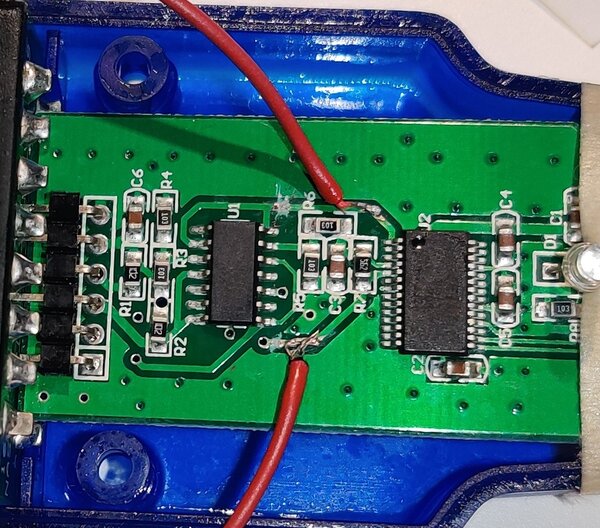
Thank you Sasha and Serg.
I understand to connect the pins directly, but it's too dark to solder now. So I connected all the grounds and checked there is 5V on FWE.
I broke the board traces from the FTDI chip to the LM339 and checked they are cut with a ohmmeter. Still no luck. I tried inverting the tx rx again.
It must be my cheap VAGCOM cable. Although it has the correct FTDI chip. Maybe I need to order the DLP232.
I'll try with a 12V battery next.
| Attachments: |
IMG_20210510_205259~2.jpg [ 357.91 KiB | Viewed 13124 times ]
|
|
|
| Top |
|
|
|
aaa
|
Post subject: Re: SH Boot Mode How-to Posted: Tue May 11, 2021 4:03 am |
|
|
| Newbie |
Joined: Thu Apr 22, 2021 1:57 am
Posts: 28
|
|
Here is the whole setup. I have 12V power to B135 Backup 19, Control 5&6, B... OH, I see there is Ignition Switch and Ignition Control. I think I need Control not Switch maybe..
Edit: no, I think Ignition Switch was right. Ignition Control shows only 1-3.4V while running.
I'll try plugged into car harness tomorrow, so I don't overpower it again.
| Attachments: |

IMG_20210510_205409~2.jpg [ 547.95 KiB | Viewed 13123 times ]
|
Last edited by aaa on Tue May 11, 2021 4:19 am, edited 2 times in total.
|
|
| Top |
|
|
|
Sasha_A80
|
Post subject: Re: SH Boot Mode How-to Posted: Tue May 11, 2021 4:14 am |
|
|
| Senior Member |
Joined: Mon Jan 19, 2009 6:31 pm
Posts: 1615
Location: Moscow, Russia
|
|
Do not use Ignition Control Relay output.
You will overload the control circuit.
Ignition Switch signal may need to be powered .
This PCB does not need Ignition Switch to be powered as far as I remember.
I have seen a lot of fake FT232RL chips. They draw 20-40 ma of 5 V power while the original chip draws almost nothing.
Windows7/Windows8/Windows10 driver disables fakes by setting USB PID to 0000.
|
|
| Top |
|
|
|
aaa
|
Post subject: Re: SH Boot Mode How-to Posted: Tue May 11, 2021 11:07 pm |
|
|
| Newbie |
Joined: Thu Apr 22, 2021 1:57 am
Posts: 28
|
|
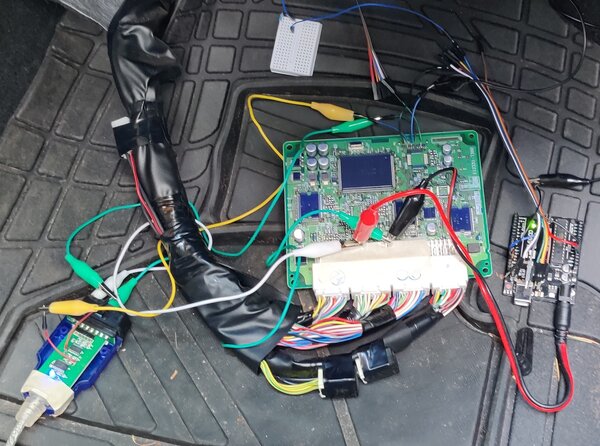
Still not working. It turns out the wiring harness for 05 Forester (link above) is different than 09 (and I can't find a pinout for 09 anywhere). So I found 12v and gnd to power the ftdi and Arduino, but still nothing.
It's hard to say what the problem is because I haven't found a way to make sure the watchdog is working beside the possiblity of checking the reset pin I mentioned above.
I just ordered an ecu from ebay. It's less than a different vagcom cable or the dlp232 chip. I wish I had shbootmode working though in case I borked another one. Oh well, thanks for your help.
| Attachments: |
IMG_20210511_154823~2.jpg [ 725.63 KiB | Viewed 13106 times ]
|
|
|
| Top |
|
|
|
SergArb
|
Post subject: Re: SH Boot Mode How-to Posted: Wed May 12, 2021 12:32 am |
|
|
| Experienced |
|
Joined: Sun Aug 18, 2019 12:10 pm
Posts: 278
Location: Russia, Ulan-Ude (Near Lake Baikal)
|
Try to make a watchdog with 555 timer. It's very simple, but 100% working solution. Attachment:
 Watchdog.jpg [ 106.69 KiB | Viewed 13103 times ]
Attachment:
 WDT.jpg [ 654.31 KiB | Viewed 13103 times ]
_________________
Subaru Outback BR9 EDM 2010 EJ253 CVT... Subaru Impreza GG2 JDM 2001 EJ152 AT...
Some Hitachi ROM's modifications...
|
|
| Top |
|
|
Who is online |
Users browsing this forum: No registered users and 3 guests |
|
You cannot post new topics in this forum
You cannot reply to topics in this forum
You cannot edit your posts in this forum
You cannot delete your posts in this forum
You cannot post attachments in this forum
|
|


