RomRaider Logo

RomRaider

Open Source ECU Tools
 FAQ •  Register •  Login 

RomRaider

Documentation

Community

Developers

It is currently Tue Dec 23, 2025 2:15 pm

All times are UTC - 5 hours [ DST ]


Post new topic Reply to topic  [ 211 posts ]  Go to page 1, 2, 3, 4, 5 ... 15  Next
Author Message
 Post subject: SPREADSHEET: Scale Closed Loop MAF Table and Injectors
PostPosted: Wed May 23, 2007 7:40 pm 
Offline
Administrator
User avatar

Joined: Wed Oct 25, 2006 12:32 am
Posts: 3040
EDIT: I don't use this spreadsheet anymore. I use the method outlined in the thread here:

topic4911-60.html" onclick="window.open(this.href);return false;

A sample spreadsheet is included in my post in that thread. I'm going to leave this spreadsheet here just in case there's some information available.

A better update to the spreadsheet is here: viewtopic.php?f=32&t=6313&p=60882


WARNING: The MAF and the injectors can not be scaled simultaneously since we rely upon a AF Ratio to scale them.

MAF: I scale the MAF in stages and try to scale the MAF using AFR data that is steady state. In other words d(MAF)/d(time) is small or zero.

1. Closed loop range between idle and 60 g/s.
2. Open loop low range using WBO2 and 5th gear logs with about 50% to 70% throttle and WGDC = 0.
3. Open loop middle range using WBO2 and 3rd gear WOT logs and WGDC = 0.
4. Open loop high range using WBO2 and 3rd gear WOT logs with normal WGDC and normal boost levels. For this, I change the arbitrary AFR target to 10.5 to be conservative since MAF is unknown.
5. Change AFR table back to real targets and then make fine adjustments to AFR targets to hit correct AFR based upon rpm and load. MAF scale is never perfect.
6. Do all of the above with one type of fuel.

To scale the MAF in closed loop, I use the closed loop corrections. To simplify the job, I use this spreadsheet to tabulate the data for me. Instructions are embedded in the spreadsheet.

As an alternative to this spreadsheet, you can also just adjust the AFR Learning ranges and use AFR Learning to estimate the deltas. The only problem that I have found with this method is that AFR Learning D takes a long time stabilize since most people do not drive steady state at 40-60 g/s. Unless you are logging your driving, there is no way to know when is there enough data.

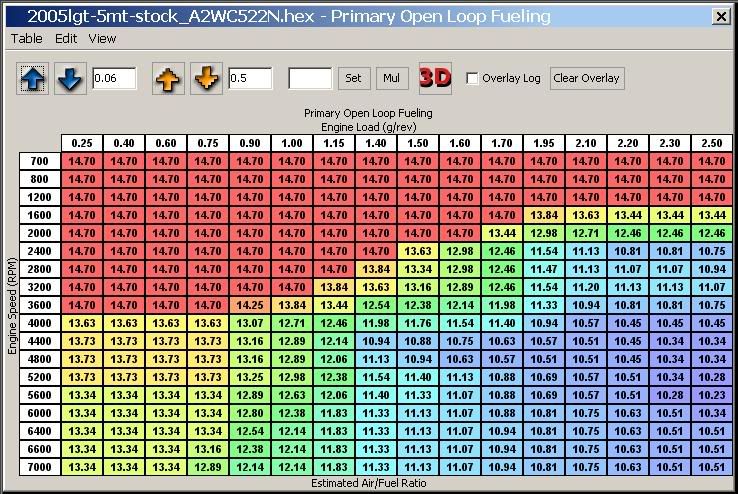
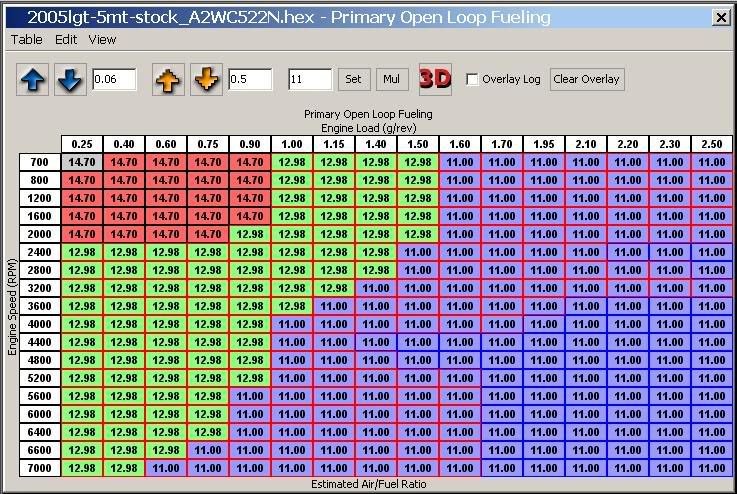
For open loop MAF scaling, it is easier to scale the low-range MAF (60-120 g/s) if the AFR target is lowered in the CL range to something less than 14.7. Here is an example of a simplified AFR target table that can be used to scale the MAF in open loop using a WBO2.

Stock AFR Target:
Image

Simplified AFR Target for scaling MAF in open loop:
Image


Injectors: This spreadsheet can also calculate injector scalar and latency using closed loop data. Latency can also be calculated using fast stationary revs. However, I have found that stationary data is not as reliable depending upon the intake type and how much it is affected by heat soak.

Using the 10-60 g/s range to calculate latency seems to be more accurate.

Keep in mind that when using this spreadsheet to scale the injectors and calculate latency that it assumes the MAF has already been scaled.


Attachments:
File comment: Added street tuner parameter names and some other stuff.
Closed Loop Fueling Rev 7.zip [331.04 KiB]
Downloaded 2100 times
Closed Loop Fueling Rev 6.zip [512.25 KiB]
Downloaded 3006 times


Last edited by mickeyd2005 on Thu Mar 06, 2008 2:29 pm, edited 11 times in total.
Top
 Profile  
 
 Post subject:
PostPosted: Mon Jun 25, 2007 1:11 am 
Offline
RomRaider Donator

Joined: Wed Aug 02, 2006 9:40 pm
Posts: 1067
Location: Calgary
I give this a go today but it gave me an error when filtering the data. :(

I get the same error if I run the macro with the default data that came with the spreadsheet.


Attachments:
R8 fuel trim_20070624_222110.csv [152.19 KiB]
Downloaded 1329 times
Top
 Profile  
 
 Post subject:
PostPosted: Mon Jun 25, 2007 2:48 am 
Offline
Administrator
User avatar

Joined: Wed Oct 25, 2006 12:32 am
Posts: 3040
It actually worked. Take a look at the graphs in range 2 and range 3.

There's just not enough data. Take a look at the tab "Graph Data". If you go to the bottom, you'll see that your data ends at 2.6 volts.

I didn't take the time to put an error trap in it.

If you log the same parameters again, you can continue to add more data.

It looks like you need to add some more data in the low end as well.

Unfortunately, I don't understand the logic behind what qualifies as valid data so I had to be conservative and knocked out a lot of data that I was unsure if it was valid or not.

This spreadsheet is probably overkill for most people. I think you can get by with just logging LTFT. However, I'm hoping to adapt this statistical approach for other stuff like tip-in, etc... by modifying the logic statements.


Top
 Profile  
 
 Post subject:
PostPosted: Mon Jun 25, 2007 2:53 am 
Offline
Administrator
User avatar

Joined: Wed Oct 25, 2006 12:32 am
Posts: 3040
Did you say that you got the same error with the default data?

I just downloaded it and ran it. It seemed to work. If you open the spreadsheet straight away, click on Grab Headers and then click on Filter Data. Don't do anything else.


Top
 Profile  
 
 Post subject:
PostPosted: Mon Jun 25, 2007 12:01 pm 
Offline
RomRaider Donator

Joined: Wed Aug 02, 2006 9:40 pm
Posts: 1067
Location: Calgary
My home PC has Excel 2000 and that error'd out during the filtering. Tried it on my work PC with Excel 2003 and it worked with the default data. On Excel 2003, my data file would generate an error toward the end where it is formating the charts (from lack of data I assume).

On Excel 2000, it will not finish filtering the data. There will be blank rows between groups of data.


Top
 Profile  
 
 Post subject:
PostPosted: Mon Jun 25, 2007 12:49 pm 
Offline
Experienced
User avatar

Joined: Wed Mar 01, 2006 10:51 pm
Posts: 345
Airboy wrote:
My home PC has Excel 2000 and that error'd out during the filtering. Tried it on my work PC with Excel 2003 and it worked with the default data. On Excel 2003, my data file would generate an error toward the end where it is formating the charts (from lack of data I assume).

On Excel 2000, it will not finish filtering the data. There will be blank rows between groups of data.


Boo Microsoft!

I did see the note about Airboy wanting to port his over to Open Office. I definitely think that would fit the open source theme better, but does it offer the same functionality as Excel with regard to all the pretty graphs and so on?

_________________
- Justin
download my ROM


Top
 Profile  
 
 Post subject:
PostPosted: Mon Jun 25, 2007 11:39 pm 
Offline
RomRaider Donator
User avatar

Joined: Sun Apr 09, 2006 12:05 pm
Posts: 867
Location: Indianapolis, IN
I haven't used it in a while, but I always found OO spreadsheet was not nearly as good as Excel. It works fine for basics, but once you really get into you always end up running into roadblocks.


Top
 Profile  
 
 Post subject:
PostPosted: Tue Jun 26, 2007 12:02 am 
Offline
Newbie

Joined: Mon Sep 25, 2006 6:40 pm
Posts: 25
This approach is close to what I did. Although I threw out anything +/- 1 past the target AFR and anything with 0% throttle instead of the 15 second thing. I also found that my corrections were more stable after about 10 minutes of driving, so I threw out the first 10 minutes, too.


Top
 Profile  
 
 Post subject:
PostPosted: Tue Jun 26, 2007 12:24 am 
Offline
Administrator
User avatar

Joined: Wed Oct 25, 2006 12:32 am
Posts: 3040
Yeah, I normally don't datalog until after the car is fully warmed up. That's about five to ten minutes of driving for me.

The 15 second thing was recently added. I was told that after coasting in gear, the ecu will richen up the closed loop fueling for between 5 to 15 seconds. However, I found out that when I added this logic, it didn't change my answer so :?: It did throw out a lot of data though.

What I really want to do is modify this spreadsheet to solve for injector tip in.


Top
 Profile  
 
 Post subject:
PostPosted: Tue Jun 26, 2007 5:21 pm 
Offline
RomRaider Donator

Joined: Thu Nov 23, 2006 4:04 pm
Posts: 82
How does one use this with a 16-bit ECU? I don't have the ability to log OL/CL status yet. Can I cheat by making it always assume CL some how?


Top
 Profile  
 
 Post subject:
PostPosted: Tue Jun 26, 2007 6:15 pm 
Offline
Administrator
User avatar

Joined: Wed Oct 25, 2006 12:32 am
Posts: 3040
lancelucas wrote:
How does one use this with a 16-bit ECU? I don't have the ability to log OL/CL status yet. Can I cheat by making it always assume CL some how?


Yes... I actually added that column after the new defs came out. I thought it might be more accurate. I guess I can modify the macro so that if the OL/CL status flag is blank then it will use AFR Correction #1 to determine if it is in open or closed loop.

There were some rare instances when the AFR Correction #1 was equal to zero but it was still in closed loop.

I might add it tonight or you can add a column and put an if equation into it. If AFR Correction #1 < 0.001 then place a 10 in the cell otherwise place an 8 in the cell.


Top
 Profile  
 
 Post subject:
PostPosted: Tue Jun 26, 2007 8:58 pm 
Offline
RomRaider Donator

Joined: Thu Nov 23, 2006 4:04 pm
Posts: 82
I have an hour set aside tonight for a nice cruise around town and testing this out. If you can fix up the macro, I'd be happy to test it :D


Top
 Profile  
 
 Post subject:
PostPosted: Wed Jun 27, 2007 2:11 am 
Offline
Administrator
User avatar

Joined: Wed Oct 25, 2006 12:32 am
Posts: 3040
Using the STFT = 0 as a flag for open loop is not as accurate as using the status flag. When I ran through it, it deleted a lot of valid data and gave me fuel trims that I know are about 1 to 2 % wrong.

Here is a copy of it if you want to try it. However, I would wait until merchgod releases his next defs release.

Use this only for 16 bit without the OL/CL status flag.


Last edited by mickeyd2005 on Mon Aug 13, 2007 3:28 pm, edited 1 time in total.

Top
 Profile  
 
 Post subject:
PostPosted: Wed Jun 27, 2007 3:09 am 
Offline
RomRaider Donator

Joined: Thu Nov 23, 2006 4:04 pm
Posts: 82
mickeyd2005 wrote:
Using the STFT = 0 as a flag for open loop is not as accurate as using the status flag. When I ran through it, it deleted a lot of valid data and gave me fuel trims that I know are about 1 to 2 % wrong.

Here is a copy of it if you want to try it. However, I would wait until merchgod releases his next defs release.

Use this only for 16 bit without the OL/CL status flag.


Seems to work, thank you very much.

I'll collect some more logs tomorrow on the way to work and hopefully have a follow-up post shortly.


Top
 Profile  
 
 Post subject:
PostPosted: Fri Jul 06, 2007 1:39 pm 
Offline
Administrator
User avatar

Joined: Wed Oct 25, 2006 12:32 am
Posts: 3040
Airboy wrote:
On Excel 2003, my data file would generate an error toward the end where it is formating the charts (from lack of data I assume).


There was an error in the spreadsheet. It wasn't "clearing" the graph ranges correctly. The error only happened if you have LESS data than the previous graphs. Since I only added data, I didn't notice this error.

Today, I rescaled my MAF and was rechecking it so I noticed this error. The updated spreadsheet on post #1 correctly clears the old graphs.


Top
 Profile  
 
Display posts from previous:  Sort by  
Post new topic Reply to topic  [ 211 posts ]  Go to page 1, 2, 3, 4, 5 ... 15  Next

All times are UTC - 5 hours [ DST ]


Who is online

Users browsing this forum: No registered users and 1 guest


You cannot post new topics in this forum
You cannot reply to topics in this forum
You cannot edit your posts in this forum
You cannot delete your posts in this forum
You cannot post attachments in this forum

Jump to:  
Powered by phpBB © 2000, 2002, 2005, 2007 phpBB Group
Style based on FI Subsilver by phpBBservice.nl