RomRaider Logo

RomRaider

Open Source ECU Tools
 FAQ •  Register •  Login 

RomRaider

Documentation

Community

Developers

It is currently Sat Feb 21, 2026 5:09 pm

All times are UTC


Post new topic Reply to topic  [ 6 posts ] 
Author Message
 Post subject: Beginners course on DBW disassembly with IDA
PostPosted: Wed Jul 25, 2007 12:21 am 
Offline
RomRaider Donator
User avatar

Joined: Sun Apr 09, 2006 4:05 pm
Posts: 867
Location: Indianapolis, IN
I was writing a reply to one other threads on 16bit ROM disassembly and thought I'd just start a new thread...

Before you do anything on a DBW rom, make sure to add the RAM segment at least.

Here's the pattern to look for the DBW roms to get most of the code:

http://freon.shackspace.com/car/ecu%20a ... ptable.png

It's always in about the same spot (0x4000-0x6000 -ish). Even EDM models (just opened a 2003 EDM LGT and it is 0x49D8, above picture is 2004 US STI AJ243). I think this where the OS level is actually interacting with the actual code for engine operation.

I just run down this part of the rom ("o", down arrow, "o", down arrow, etc), then double click the valid ROM locations, then press "P" to declare it a sub routine, then hit back arrow and do this again for the next valid ROM location. This gets about 60-75% of the valid code area in the DBW roms, and definitely gets all the ignition, fueling, CEL, DBW, and A/D stuff. If you do it right, most of the bar at the top will turn blue.

You might also want to find the VBR. It is usually (always?) the very last thing in the ROM, and has all the subroutine calls for interrupts and CPU faults and errors and such. It is set by software, but easy enough to see, and it is set very early in the bootup sequence for what will become obvious once you start to get a handle on things. It's a bunch of locations, usually pointing to very early locations in the rom (below ~0x10000). You can mark them all subroutines ("p") as well. Mainly it is the ATU calls that are interesting. You can look up the VBR stuff in the hardware manuals and see what they line up to.

There are a few other jump tables in the ROM, but they don't seem to control the more interesting stuff.

You'll want to quickly identify the memory locations for RPM, MAP, engine load, coolant temp, and intake temp. You can use existing maps to help. Also, there are a series of subroutines to pull 3D and 2D map data which you'll want to mark. Not too hard. Rename these to pull_3d or whatever. You'll also see the row and column data are loaded into fr5 and fr4 (i.e. for pulling base ignition timing it sets fr5 = rpm and fr4 = load) immediately before the pull_3d or pull_2d subroutine call, and r4 is set to the address location for the map's definition array (i.e. r4 = the location you see if you look at the map def location in Enguinity). Since you know where base ignition timing is, you can follow the reference, then find out what is set to fr4 and fr5 right before the map is pulled, then you now know what addresses in memory are RPM and engine load!


Top
 Profile  
 
 Post subject:
PostPosted: Wed Jul 25, 2007 12:22 am 
Offline
RomRaider Donator
User avatar

Joined: Sun Apr 09, 2006 4:05 pm
Posts: 867
Location: Indianapolis, IN
saving post #2 for now...


Top
 Profile  
 
 Post subject:
PostPosted: Wed Jul 25, 2007 1:52 am 
Offline
RomRaider Developer

Joined: Wed Jul 12, 2006 1:25 am
Posts: 1025
Thank you, this is very much appreciated.


Top
 Profile  
 
 Post subject:
PostPosted: Tue Jul 31, 2007 3:53 am 
Offline
RomRaider Developer

Joined: Wed Jul 12, 2006 1:25 am
Posts: 1025
Please let me know if you want me to take some of these screen shots down if you find that they do more to confuse your thread.


While I'm at it and for others to see, I should select the Hitachi SH4B instruction set? ;)


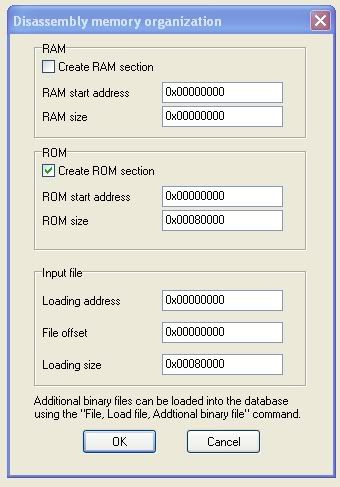
For the usdm STi rom you reference in the first post, how do you find the ROM start address? I bring this up as the first screen upon opening up a ROM asks for this. Is this also the same screen to add the RAM segment?

Image


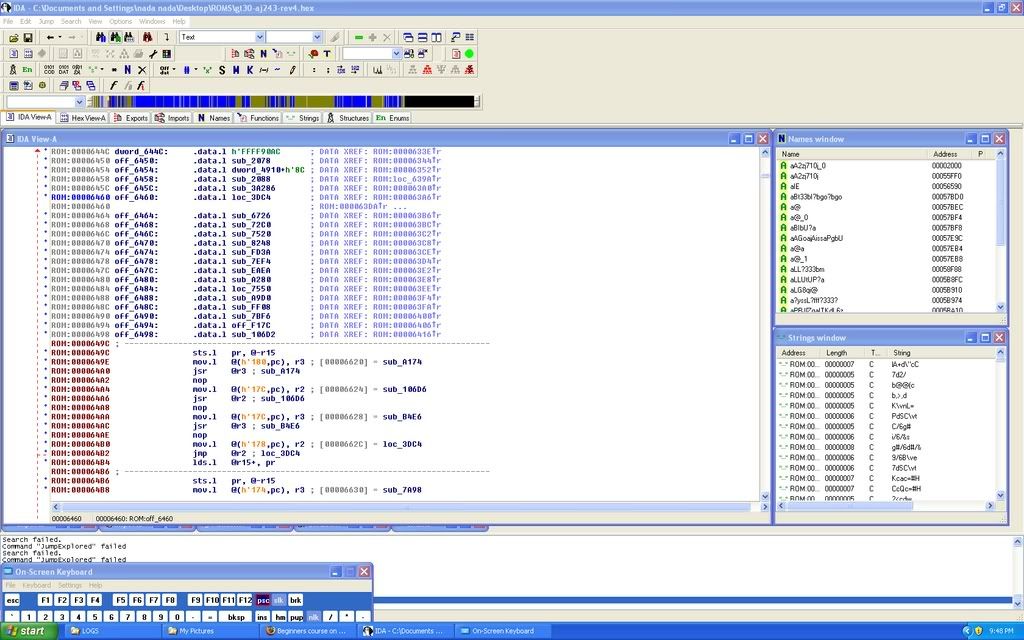
After loading the STi ROM, I highlighted ROM addresses 00004000 though 00007000 and hit the 'c' key to start the auto code analysis. IDA went ape for a while and the "blue" bar up top appeared much as you said it would by walking the code pressing the 'o' key.

Image


Top
 Profile  
 
 Post subject:
PostPosted: Thu Oct 11, 2007 7:43 am 
Offline
Newbie

Joined: Thu Sep 28, 2006 4:35 am
Posts: 3
which is the current version that supports our processor anyhow


Top
 Profile  
 
 Post subject:
PostPosted: Thu Oct 11, 2007 7:58 pm 
Offline
RomRaider Donator
User avatar

Joined: Sun Apr 09, 2006 4:05 pm
Posts: 867
Location: Indianapolis, IN
Start address is always 0x0. End address is defined by the size. You never need to touch that, IDA fills it out for you.

You can get the start and stop or size of RAM from the 7055 or 7058 Renesas manuals, along with other segments.

You want to select SH 4B. It includes all the instructions in the CPUs we are looking at.


Top
 Profile  
 
Display posts from previous:  Sort by  
Post new topic Reply to topic  [ 6 posts ] 

All times are UTC


Who is online

Users browsing this forum: No registered users and 5 guests


You cannot post new topics in this forum
You cannot reply to topics in this forum
You cannot edit your posts in this forum
You cannot delete your posts in this forum
You cannot post attachments in this forum

Jump to:  
Powered by phpBB © 2000, 2002, 2005, 2007 phpBB Group
Style based on FI Subsilver by phpBBservice.nl