|
RomRaider
Documentation
Community
Developers
|
| Author |
Message |
|
merchgod
|
Post subject: Re: Subaru's knock control strategy explained  Posted: Posted: Mon Jan 26, 2009 11:52 pm |
|
 |
| RomRaider Donator |
 |
Joined: Thu Mar 30, 2006 2:38 am
Posts: 5336
|
|
Ok, so I looked at the alternate means for entering rough correction mode for the 32-bit ECU (the oddity I talked about before that I hadn't messed with yet). There is an alternate group of conditions to allow for entering rough correction mode from fine correction mode that can occur without any of the normal conditions being met.
First, the IAM has to 0.3125 to 0.6875. The ECU has a RAM table that basically mirrors the FLKC table's load/rpm ranges, but keeps track of only whether the last change to the FLKC table for each cell was positive or negative. When in fine correction mode, over a short period of time (say 300ms), the ECU looks at the change table (current cell(s)). If the last change was positive, it compares the current FLKC against a series of thresholds based on the IAM:
0.3125,0.4375,0.5626,0.6875 IAM
2.75, 2.25, 1.75, 1.25 FLKC
If the current FLKC is greater than the corresponding threshold, then a counter is incremented. If the counter reaches a certain threshold before the period of "time" expires, then the ECU will enter rough correction mode (as long the IAM is also in the range shown above).
EDIT: the change table actually only keeps track of positive corrections. There's no distinction between no correction and negative correction.
|
|
| Top |
|
 |
|
05wrx
|
Post subject: Re: Subaru's knock control strategy explained Posted: Sat Apr 25, 2009 7:45 am |
|
|
| Experienced |
 |
Joined: Fri Apr 03, 2009 4:49 am
Posts: 134
Location: Denver, CO
|
So I may just be the newest and most retarded person to ask this, but why does my screenshot of Learning View look like this: 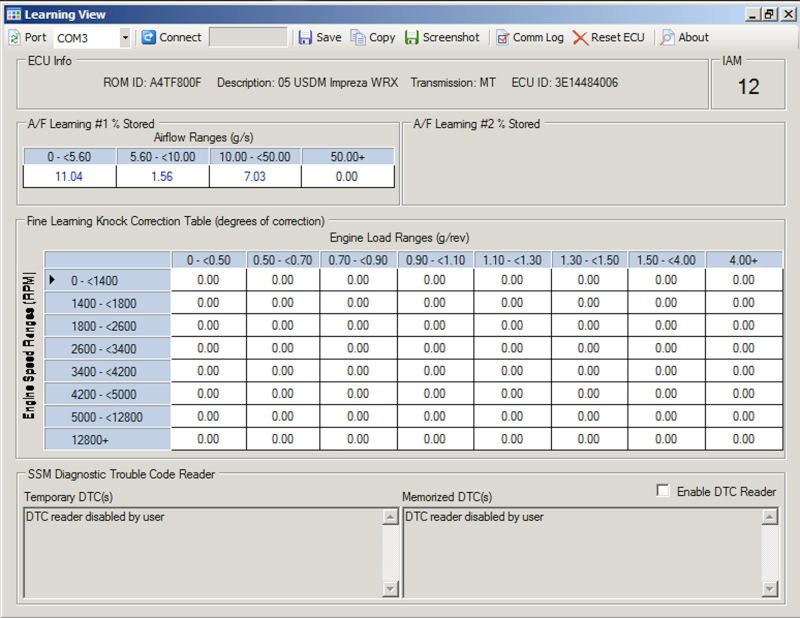 I mean, why all 0s? That helps me in no way, correct? I was referred to this program by someone who is trying to help me figure out why my IAM never goes all the way to 16 and just stops at 15...
|
|
| Top |
|
|
|
merchgod
|
Post subject: Re: Subaru's knock control strategy explained Posted: Sat Apr 25, 2009 12:30 pm |
|
|
| RomRaider Donator |
|
Joined: Thu Mar 30, 2006 2:38 am
Posts: 5336
|
05wrx wrote: So I may just be the newest and most retarded person to ask this, but why does my screenshot of Learning View look like this:
I mean, why all 0s? That helps me in no way, correct?
I was referred to this program by someone who is trying to help me figure out why my IAM never goes all the way to 16 and just stops at 15... The entire FLKC table is cleared evertime the IAM changes. I'm assuming you are the guy that posted on Nasioc about his IAM being stuck at 15? Looks like you recently did an ECU reset. You have to wait for the IAM to "settle" before it switches over to FLKC mode and will start populating the table, if necessary. After a reset, the ECU enters rough correction (IAM) mode.
|
|
| Top |
|
|
|
05wrx
|
Post subject: Re: Subaru's knock control strategy explained Posted: Sat Apr 25, 2009 6:30 pm |
|
|
| Experienced |
|
Joined: Fri Apr 03, 2009 4:49 am
Posts: 134
Location: Denver, CO
|
merchgod wrote: 05wrx wrote: So I may just be the newest and most retarded person to ask this, but why does my screenshot of Learning View look like this:
I mean, why all 0s? That helps me in no way, correct?
I was referred to this program by someone who is trying to help me figure out why my IAM never goes all the way to 16 and just stops at 15... The entire FLKC table is cleared evertime the IAM changes. I'm assuming you are the guy that posted on Nasioc about his IAM being stuck at 15? Looks like you recently did an ECU reset. You have to wait for the IAM to "settle" before it switches over to FLKC mode and will start populating the table, if necessary. After a reset, the ECU enters rough correction (IAM) mode. Yea, that's me  I guess there is just a wealth of knowledge out here and I'm trying to take it all in. I did do the Learning View you see here before the ECU reset. Then I reset the ECU and did some logs, then came back and did another Learning View which read my IAM at 8 this time, with all the 0s still in place. So I should wait for the ECU to settle at 15/16 *hopefully* and then do a Learning View? Someone was suggesting to me that I do a Learning View immediately following an ECU reset, but I don't think it will provide much data?
|
|
| Top |
|
|
|
merchgod
|
Post subject: Re: Subaru's knock control strategy explained Posted: Sat Apr 25, 2009 11:11 pm |
|
|
| RomRaider Donator |
|
Joined: Thu Mar 30, 2006 2:38 am
Posts: 5336
|
|
A learning view right after a reset isn't going to tell you anything. I would just periodically check it. You many want to be logging as well if the IAM is all over the place.
|
|
| Top |
|
|
|
05wrx
|
Post subject: Re: Subaru's knock control strategy explained Posted: Mon Apr 27, 2009 7:42 am |
|
|
| Experienced |
|
Joined: Fri Apr 03, 2009 4:49 am
Posts: 134
Location: Denver, CO
|
merchgod wrote: A learning view right after a reset isn't going to tell you anything. I would just periodically check it. You many want to be logging as well if the IAM is all over the place. Well, good news is my IAM is now at 16! It has never gotten to 16 before! Not since I flashed to Stage 1 a while back and have been logging and stuff. What do you think of this now: 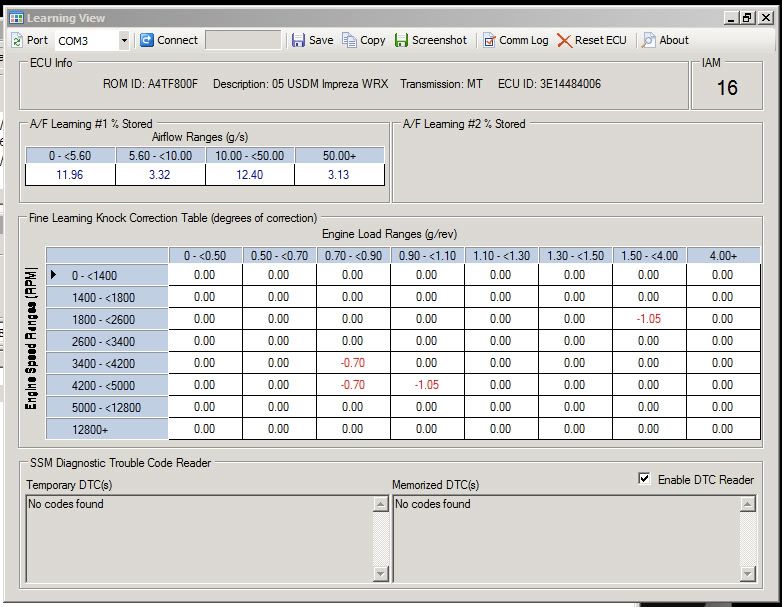 I'm thinking the red values indicate...badness?
|
|
| Top |
|
|
|
03wrxtc
|
Post subject: Re: Subaru's knock control strategy explained Posted: Sun May 03, 2009 5:58 pm |
|
|
| RomRaider Donator |
 |
Joined: Mon Jan 12, 2009 7:29 am
Posts: 197
Location: California
|
|
i got a question about IAM
i've been looking through alot of maps and noticed that some start with a lower number then 16???
why??
its the advance mutiplier initial??
e.g. A4TC401L newest 03 wrx rom and the advance multiplier is at 10. initial.
why is this?
why would you start off with a lower number then 16??
thanks,
03 wrxtc
_________________
Drive it like you stole it.
03wrxtc
|
|
| Top |
|
|
|
merchgod
|
Post subject: Re: Subaru's knock control strategy explained Posted: Sun May 03, 2009 6:15 pm |
|
|
| RomRaider Donator |
|
Joined: Thu Mar 30, 2006 2:38 am
Posts: 5336
|
03wrxtc wrote: i got a question about IAM
i've been looking through alot of maps and noticed that some start with a lower number then 16???
why??
its the advance mutiplier initial??
e.g. A4TC401L newest 03 wrx rom and the advance multiplier is at 10. initial.
why is this?
why would you start off with a lower number then 16??
thanks,
03 wrxtc From the factory, initial iam is usually 8 raw (0.5 multiplier). The A4TC401L should also be 8 initial, unless a tuner modified the ROM you downloaded. The initial IAM is not only the IAM after a reset, it is also the initial IAM at the beginning of each IAM re-evaluation session. So, if, say you put 87 octane in the tank and IAM was going to drop to 0, with an initial of 8, it would hit zero faster than an initial of 16.
|
|
| Top |
|
|
|
03wrxtc
|
Post subject: Re: Subaru's knock control strategy explained Posted: Sun May 03, 2009 10:33 pm |
|
|
| RomRaider Donator |
|
Joined: Mon Jan 12, 2009 7:29 am
Posts: 197
Location: California
|
merchgod wrote: 03wrxtc wrote: i got a question about IAM
i've been looking through alot of maps and noticed that some start with a lower number then 16???
why??
its the advance mutiplier initial??
e.g. A4TC401L newest 03 wrx rom and the advance multiplier is at 10. initial.
why is this?
why would you start off with a lower number then 16??
thanks,
03 wrxtc From the factory, initial iam is usually 8 raw (0.5 multiplier). The A4TC401L should also be 8 initial, unless a tuner modified the ROM you downloaded. The initial IAM is not only the IAM after a reset, it is also the initial IAM at the beginning of each IAM re-evaluation session. So, if, say you put 87 octane in the tank and IAM was going to drop to 0, with an initial of 8, it would hit zero faster than an initial of 16. so basiclly it come's down to how much advance your adding? at initial 8 were its only adding half of the advance?? instead at 16 which your adding full advance when needed?
_________________
Drive it like you stole it.
03wrxtc
|
|
| Top |
|
|
|
merchgod
|
Post subject: Re: Subaru's knock control strategy explained Posted: Mon May 04, 2009 12:34 am |
|
|
| RomRaider Donator |
|
Joined: Thu Mar 30, 2006 2:38 am
Posts: 5336
|
03wrxtc wrote: so basiclly it come's down to how much advance your adding?
at initial 8 were its only adding half of the advance??
instead at 16 which your adding full advance when needed? When the ECU is reset, you start in rough correction mode and the IAM is reset to the initial value (usually 8 with the factory tune). As conditions are met as described in this sticky and there's no knock over a delay period, the IAM will increase by the step value. If it changes directions (knock = decrease, no knock over delay period = increase), the step value is halved and if that occurs twice, the ECU has determined that the IAM has "settled" and it move to FLKC mode. Or, if the IAM hits the max (16) for a short period of time, then it will switch to FLKC mode. The latter is what generally occurs with a good tune. The idea behind IAM is to be able to globally and roughly correct timing all at once. So, if your IAM is 16 and you put 87 octane in the tank, the ECU can quickly remove a boatload of timing across the board.
|
|
| Top |
|
|
|
05wrx
|
Post subject: Re: Subaru's knock control strategy explained Posted: Thu May 07, 2009 7:21 am |
|
|
| Experienced |
|
Joined: Fri Apr 03, 2009 4:49 am
Posts: 134
Location: Denver, CO
|
So I can't imagine this is a good thing, eh? Gots me all kinds 'o worried I've never seen it this bad... 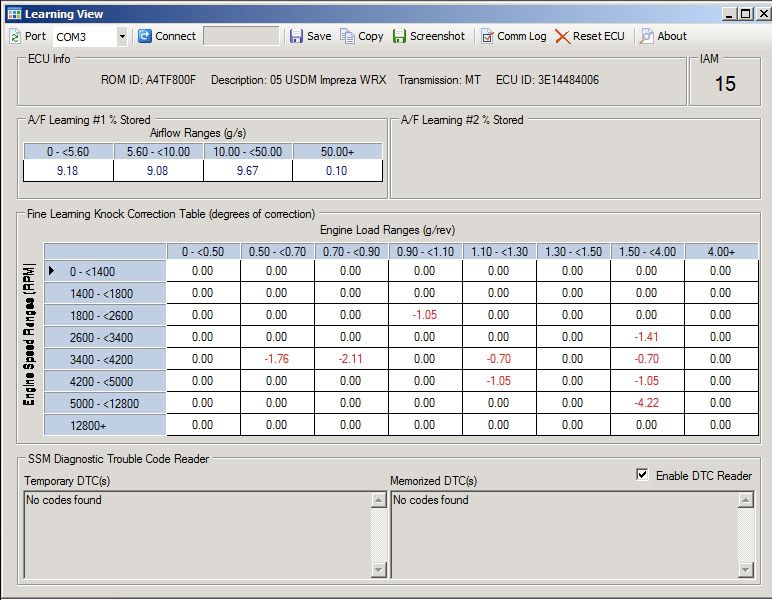
|
|
| Top |
|
|
|
wrxsti-l
|
Post subject: Re: Subaru's knock control strategy explained Posted: Thu May 07, 2009 2:49 pm |
|
|
| RomRaider Donator |
 |
Joined: Wed Feb 06, 2008 7:49 am
Posts: 1054
Location: Australia
|
05wrx wrote: So I can't imagine this is a good thing, eh? Gots me all kinds 'o worried I've never seen it this bad... You have learnt knock. All those areas that are in red text are rpm/load points where knock has occurred. It is actually at the point where you have dropped out of fine learning and back into rouch correction and your IAM is now dropping down to 15. I'm not sure how other people do it, but here is how I have been doing it: - First log AFR using WB02 and check that the AFR is not too lean at the rpm/load points that are red.
- If AFR is fine, do a quick, rough, cleanup. Halve the red text values in learning view and then take that value away from the rpm/load region in your base timing table.
Eg. at 0.50-<0.70 load and 3400-<4200 rpm you have -1.76. Half of -1.76 is -0.88, so edit your base timing table and subtract 0.88 from all the points that are in the 0.50-<0.70 load and 3400-<4200 rpm region
- Now go do 1/2 throttle 3rd and 4th logs as well as WOT 3rd and 4th logs from around 2000rpm-redline, and log engine load, engine speed, FBKC, FLKC, WB02 and ITT.
- If at any point during any of the logs you get constant knock, stop logging, open your log file, find the point where it knocked, halve the value, and then take that away from the rpm/load point(s) in your base timing and try again.
- Once no knock is being reported while logging, you should be fine - but still check in learningview periodically. If you do happened to see red text in some of the learningview cells, repeat the steps above.
Note: it'll take a while for the ecu to go into fine correction again and for learningview to start displaying learnt knock again after each reflash.
That is what I do, ppl do different things, I'm not sure exactly why I halve the FBKC/FLKC/learningview knock values, I guess I didn;t want to start taking too much timing out if I didn't need to, but anyhoo it works well for me at stopping knock. Maybe one of the more experienced tuners can comment and if this is an inefficient (or bad) way of correcting knock, maybe they could post up a better method EDIT: I also just noticed your A/F learning is out by over 9% across the board - you want to try and sort that. I'm guessing you have installed a CAI or short-ram pod filter, if so, you will need to rescale your MAF (using either the spreadsheet or the MAF tab in RomRaider Logger), until A/F learning is no worse then around 2%.
_________________
Current Car: 2002 ADM WRX STi
Current Engine: EJ207
Current Mods: X-Force 3" TBE Exhaust, GCG "bolt-on" GT3076R, APS 3" Hard Turbo Inlet, Short Ram Pod, RomRaider/ECUFlash Tune
Current Power: 248kw@wheels (332whp)
|
|
| Top |
|
|
|
05wrx
|
Post subject: Re: Subaru's knock control strategy explained Posted: Thu May 07, 2009 5:08 pm |
|
|
| Experienced |
|
Joined: Fri Apr 03, 2009 4:49 am
Posts: 134
Location: Denver, CO
|
wrxsti-l wrote: 05wrx wrote: So I can't imagine this is a good thing, eh? Gots me all kinds 'o worried I've never seen it this bad... You have learnt knock. All those areas that are in red text are rpm/load points where knock has occurred. It is actually at the point where you have dropped out of fine learning and back into rouch correction and your IAM is now dropping down to 15. I'm not sure how other people do it, but here is how I have been doing it: - First log AFR using WB02 and check that the AFR is not too lean at the rpm/load points that are red.
- If AFR is fine, do a quick, rough, cleanup. Halve the red text values in learning view and then take that value away from the rpm/load region in your base timing table.
Eg. at 0.50-<0.70 load and 3400-<4200 rpm you have -1.76. Half of -1.76 is -0.88, so edit your base timing table and subtract 0.88 from all the points that are in the 0.50-<0.70 load and 3400-<4200 rpm region
- Now go do 1/2 throttle 3rd and 4th logs as well as WOT 3rd and 4th logs from around 2000rpm-redline, and log engine load, engine speed, FBKC, FLKC, WB02 and ITT.
- If at any point during any of the logs you get constant knock, stop logging, open your log file, find the point where it knocked, halve the value, and then take that away from the rpm/load point(s) in your base timing and try again.
- Once no knock is being reported while logging, you should be fine - but still check in learningview periodically. If you do happened to see red text in some of the learningview cells, repeat the steps above.
Note: it'll take a while for the ecu to go into fine correction again and for learningview to start displaying learnt knock again after each reflash.
That is what I do, ppl do different things, I'm not sure exactly why I halve the FBKC/FLKC/learningview knock values, I guess I didn;t want to start taking too much timing out if I didn't need to, but anyhoo it works well for me at stopping knock. Maybe one of the more experienced tuners can comment and if this is an inefficient (or bad) way of correcting knock, maybe they could post up a better method EDIT: I also just noticed your A/F learning is out by over 9% across the board - you want to try and sort that. I'm guessing you have installed a CAI or short-ram pod filter, if so, you will need to rescale your MAF (using either the spreadsheet or the MAF tab in RomRaider Logger), until A/F learning is no worse then around 2%. Thank you very much for the advice, but I'm running Cobb's OTS Stage 2 91oct map and I'm starting to think it's crap? I can't modify anything...and no, I don't have a CAI or SRI installed and I just actually cleaned the MAF and reset the ECU a few days ago. I also installed a Walbro fuel pump last week with the Walbro sock thingy instead of the stock OEM one, and I'm wondering if that could be part of the problem maybe?  And here are my logs: http://www.fileden.com/files/2006/11/6/356271/romraiderlog_20090507_000745.csvhttp://www.fileden.com/files/2006/11/6/356271/romraiderlog_20090507_000449.csv
|
|
| Top |
|
|
|
wrxsti-l
|
Post subject: Re: Subaru's knock control strategy explained Posted: Fri May 08, 2009 12:50 am |
|
|
| RomRaider Donator |
|
Joined: Wed Feb 06, 2008 7:49 am
Posts: 1054
Location: Australia
|
|
Which "stage 2" map are you using - there are a few of them. If you are going to use a Cobb "stage" map, make sure you use the one that is most similar to your setup and the fuel you use.
What mods do you have?
Lastly, why can't you edit the tables? I thought if you had a Cobb AP and one of their free stage maps you could actually edit the ROM tables as you needed?
_________________
Current Car: 2002 ADM WRX STi
Current Engine: EJ207
Current Mods: X-Force 3" TBE Exhaust, GCG "bolt-on" GT3076R, APS 3" Hard Turbo Inlet, Short Ram Pod, RomRaider/ECUFlash Tune
Current Power: 248kw@wheels (332whp)
|
|
| Top |
|
|
|
05wrx
|
Post subject: Re: Subaru's knock control strategy explained Posted: Fri May 08, 2009 6:06 am |
|
|
| Experienced |
|
Joined: Fri Apr 03, 2009 4:49 am
Posts: 134
Location: Denver, CO
|
wrxsti-l wrote: Which "stage 2" map are you using - there are a few of them. If you are going to use a Cobb "stage" map, make sure you use the one that is most similar to your setup and the fuel you use.
What mods do you have?
Lastly, why can't you edit the tables? I thought if you had a Cobb AP and one of their free stage maps you could actually edit the ROM tables as you needed? I have the Stage 2 map, the regular one? 91oct, non-HWG or anything, just regular 91oct. And yea, if I had the V2 Accessport I could edit some stuff, but I have the V1 and I can't edit anything...so I don't know what to do....
|
|
| Top |
|
|
Who is online |
Users browsing this forum: No registered users and 8 guests |
|
You cannot post new topics in this forum
You cannot reply to topics in this forum
You cannot edit your posts in this forum
You cannot delete your posts in this forum
You cannot post attachments in this forum
|

|


