RomRaider Logo

RomRaider

Open Source ECU Tools
 FAQ •  Register •  Login 

RomRaider

Documentation

Community

Developers

It is currently Tue Dec 23, 2025 11:02 am

All times are UTC - 5 hours [ DST ]


Post new topic Reply to topic  [ 15 posts ] 
Author Message
 Post subject: 05 - 09 Subaru Immobilizer Cloning for Used ECU Replacement
PostPosted: Sun Apr 24, 2022 12:46 pm 
Offline
Newbie

Joined: Sat Mar 12, 2022 4:51 pm
Posts: 9
How to read EEPROMS on 05- 09 Subaru Ecu (Possibly Many more)

- Method is without removing the EEPROM from the board. There is an alternate method by just physically moving the eeproms to the donor units but that's pretty straight forward. This is the digital way and gives you a backup file, and no solder skills needed.

Items Needed: Laptop or Desktop PC running windows 7 or newer. **64/32 bit irrelevant

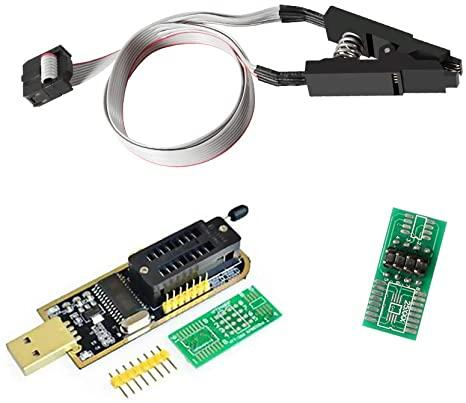
CH341A – Chinese EEPROM Programmer (Black Edition) + Clip on Adapter Shown Below
Drivers for the CH341A - I used google and got this one - CH341PAR.EXE - self installing archive with multi-protocol interface driver (this one is for the programmer mode)
Link: https://www.onetransistor.eu/2017/08/ch ... matic.html
Attachment:
File comment: CH341A – Chinese EEPROM Programmer (Black Edition)
1.jpg
1.jpg [ 79.01 KiB | Viewed 7940 times ]


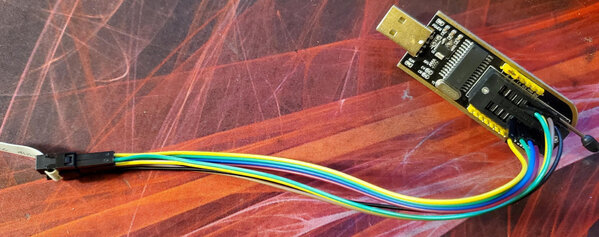
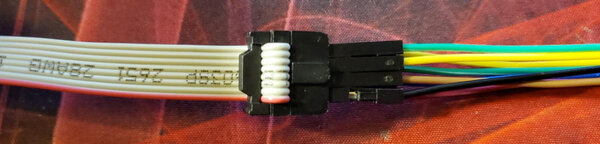
Cable / Wire to connect between programmer and clip. Preferably different colors
and male to male ends. ( Pictured Below )
Attachment:
File comment: Cable / Wire to connect
2.jpg
2.jpg [ 140.49 KiB | Viewed 7940 times ]


Your choice of Hex Editor programs. Many free Hex editors on the web. Use google.
Lastly, a programmer capable of reading the EEPROMS.
I used NEOProgrammer. It's free from the website below. Link may die eventually.
Link: https://khandishnetwork.com/dl/neoprogr ... 2-06-2021/
Attachment:
File comment: NeoProgrammer Software 2021 V2.2.0.8 – 22/06/2021
NeoProgrammer V2.2.0.8.rar [7.07 MiB]
Downloaded 219 times


The Setup:

1st off I want to start this off by stating some of the prerequisites and warnings.
You are going to do this at your own risk, I assume no liability for damages that you cause to your ecu, cluster or biu. You are going to continue at your own risk and by doing so you are agreeing that you understand you are 100% liable and can cause irreversible damage to your components.


You should only continue if you are highly comfortable with what you are doing, understand that if you do manage to erase the data without a backup you will need to purchase all new equipment from Subaru and may cost well over 2000$ USD. Do not take this lightly. Trust me.


You will need to remove your ECU and BIU from the car that has working keys. If its 2nd hand or the unit from your car, you need to have a matching BIU / ECU with at least one paired key, I can not help you if you have erased your EEPROM and do not have a backup, or you are trying to program without a working system to get data from.


If you are just changing out the ECU you only need to remove the ECU, or if only changing the BIU you only need to remove the BIU. This will cover both the ECU and BIU for documentation purposes.


Ok, so it's safe to assume, you have a ECU or BIU or maybe both sitting next to you at your desk and you are starting to prepare your tools. 1st lets identify what the ECU EEPROM is and location, as well as the BIU. This is where you will be connecting your test connector to read the stored data.
Think of the EEPROM as a mini SD card with all the secrets saved on it ready to read.


What am I looking for? EEPROMS?
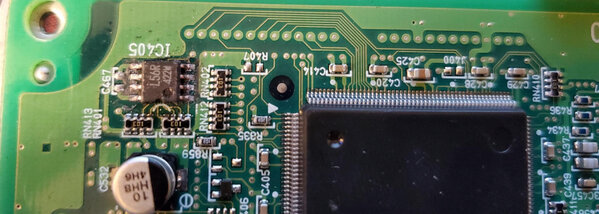
They are 8 pin Micro-wire chips shown below. Have a look!

Attachment:
File comment: 8 pin Micro-wire chip
3.jpg
3.jpg [ 466.62 KiB | Viewed 7940 times ]


ECU EEPROM:
With ECU main connections facing you, the EEPROM is in the upper left corner of the ECU.
EEPROMS on these boards have 8 pins, 4 on either side, and are marked either L56R or 93c56R
These are both Micro-wire EEPROMS. The Ecu uses 5v and the BIU uses 3.3v. Will show in system as 93c56R – Make sure to choose 5V one.
Attachment:
File comment: L56R or 93c56R Micro-wire EEPROM
4.jpg
4.jpg [ 428.57 KiB | Viewed 7940 times ]


BIU EEPROM:
With the connector facing you, you must turn the board over and look at the rear of the board. The EEPROM is located near the top and middle of the BIU board. It is labeled s24c01 and is 3.3v.
Chip will display in reader as 24c16 3.3V


More Banter, And prepping the CH431A to support 5v EEPROMS.

Okay,
So you now know where the EEPROMS are located. Guess what there's a 3rd one on your cluster too! But I haven’t pulled my cluster, nor do I really want to. This was a costly lesson I’ve learned, and in the end I’m just trying to save others from the hassle I’ve had with this. As well I’ve also managed to get a virgin ECU file and BIU by purchasing the items new and never flashed. So basically a 2000$ Unmarried ecu file used to clean used Ecu’s. But that's later and may never be shared publicly, as it cost me a fortune to acquire.


****Also I will not discuss how to change or edit the cluster due to the Mileage being saved on the cluster. Google it yourself, but I’m not helping you rollback miles, or anything of that nature. Sorry, not really, I’m the one who's out the 2k for learning this mess so you don't have to screw it up like I did.


Back to the fun stuff…

Now you have the Tools, The computer programs installed, your ECU or BIU laying next to you,
Now we need to prepare the tool for use on the ECU.


Let's start off by setting up the CH341A black edition to support the ECU EEPROM, and have it be able to put out the 5V to read the chip in the board.


You’ll need a solder Iron for this part, or you can use the jumper on the side and see if it works for you, I went ahead and did the Solder mod for 5v constant to the lower 25xxx section of the reader.
The upper 24xxx section will still support 3.3v so no worries. This is the only stage you need to add any solder to the unit, you will need to heat up one pin to remove it but this is the only stage needing solder / solder iron.

Below are the modifications to have the 25xxx slot support 5v.

You will need to connect the 5v lead from the 5 volt pin in the top right to the top right pin on the 25xx connection. My solder job is horrible, and I just used some scrap wire to make a jumper, you can do better than me, I was just going for it. You can even see the ball of solder that I accidentally dropped on the outside ring, whoops. Oh well.
Attachment:
File comment: 5v lead from the 5 volt pin
5.jpg
5.jpg [ 377.49 KiB | Viewed 7940 times ]


I also cut the trace to the 25xx on the board to avoid voltage spikes. This probably wasn’t needed. You can do it too, but it's probably a waste of time and can cause issues if you cut the ground that is close to it. But that’s what those “scratched up marks are''

Now to the other side.
Attachment:
File comment: the other side
6.jpg
6.jpg [ 483.87 KiB | Viewed 7940 times ]


Here on that center black chip – Its the voltage regulator, the middle pin out of the 3 needs to be lifted off of the board. I just took the solder iron and sat it on there for a little bit and used a pick to lift the little foot off of its pad so it won't make contact. This effectively cuts the restriction of 3.3v to the 25xxx connector.

Attachment:
7.jpg
7.jpg [ 540.53 KiB | Viewed 7940 times ]

Attachment:
8.jpg
8.jpg [ 109.16 KiB | Viewed 7940 times ]

Attachment:
9.jpg
9.jpg [ 570.61 KiB | Viewed 7940 times ]

Attachment:
10.jpg
10.jpg [ 293.62 KiB | Viewed 7940 times ]


Above shows the programmer hooked up on the 24xxx slot for the BIU. The jumper stays on #1 and #2 for all the flashes I’ve done. With the 5v mod you do not need to jumper the 3v and 5v connectors. I do not know if this will work without doing the 5v mod, so you could try to just have a jumper on 3v and 5v and one on #1 and #2 on the programmer and see if you can read the info, I can't answer that one.

Well done!
You’ve finished preparing your programmer to do what its supposed to do. Read and write these little micro-wire chips! Woot Woot.

Time to wire up your wire clamp and start reading / writing. This is of course if you have already
installed the above prerequisite drivers and programs needed to read / write.

In a nutshell I just used the Male to Male wires and pushed them into the programmer by hand,
and into the connector on the clip probe instead of soldering everything onto a breakout board.
If you like to be fancy, take the supplied breakout board with the kit and wire yourself to it,
me on the other hand, I’m lazy and my shaky hands don’t solder well.

For BIU WIRE Pin Out -
It's literally just number to number for wiring the programmer to the test clip.
On the EEPROM there is always a little dimple or O in the corner, This is for orientation.
The pin closest to the dimple or 0 is going to be number 1.
So something like this below:

1 - 8
2 - 7
3 - 6
4 - 5

The programmer is numbered the same way. Just remember it has basically 2 slots in it.
The slot closest to the locking lever is the 24xxx slot for 3.3v applications. The hole closest to the lever is number 1.
The slot below it is the 25xxx slot and it follows the same numbering as the chip 1-4 on the left and 8-5 on the right.

So wiring the BIU you literally just go 1 to 1, 2 to 2, and so on until you have all 8 slots connected to your clip matching up. Number one on the clip was marked with a red wire on my clip.
For BIU readout you will be using the 24xxx slot closest to the lever on the programmer.
I used the supplied board to orientate it so I knew what side was 1-4 and 8-5
See below photos: This was pinned out for BIU eeprom reading.
Attachment:
File comment: pinned out for BIU eeprom reading
11.jpg
11.jpg [ 126.18 KiB | Viewed 7940 times ]


ECU EEPROM Pin out:

1 on Chip to 1 on Programmer
2 on Chip to 6 on Programmer
3 on Chip to 5 on Programmer
4 on Chip to 2 on Programmer
5 on Chip to 4 on Programmer
6 UNhooked
7 UNhooked
8 on Chip to 8 on Programmer

Done. You now have successfully wired up your CH341A to read the ECU eeprom.


Now it's time to use the Neo-programmer to read the ECU or BIU.
The tool is super simple.


Open Neo-Programmer and make sure you have the chip connected, and the programmer is plugged into a working USB port. I had my speakers on so I could hear when the disconnect sound played from windows, this told me I had a good connection. To verify if you are connected hit the DETECT button on Neo-programmer. If you get options to choose a chip type you are connected to, if you get a blank box or error message in the logs you are not connected right. Keep trying and hitting detect as you position the clip. I had to hold my clip down while reading / writing to make sure it stayed on, it's a pain, and you’ll learn the best way to do it with trial and error.

Once you have a solid connection and you choose your chip ( this was broken down before )
Newer versions of Neo Programmer may ask for you to choose either 0,1,2 etc. due to multiple options. For the ECU it's under 0.
93c56r_16Bits 5v is the one for ECU / 24c16_8bits 3.3V is the BIU.
Okay, Time to hit the read button and see what happens!
Click the read button located at the top of Neo Programmer. If you get something other than all 0 or F you got it! The top 3 lines should contain Key Data, the next 3 are your VIN repeated 3x. And the last 6 or so lines are a checksum for the ecu and other data that I don’t have knowledge of. This is more so helping you save the entire file so you can clone it over to a donor ecu or store it in-case you have issues with the units.


Below is Neo-Programmer, I’m not going to go into a ton of data on how to use it, its really simple.
The Detect button is huge! Don't try clicking other stuff until you know you can detect and select the appropriate chip type, this way you know your connection is good. Read is the button next to the big floppy disk for “save”. Write is next to read.

Steps – Connect clip to the eeprom. Click detect and choose the appropriate chip you are working with.
Once selected click read and make sure it populates the data. SAVE IT, SAVE IT, SAVE IT.
If you delete this data, corrupt it etc., you will be buying a new ecu and new BIU from Subaru as I have no way to help you recover the key data or security id data. Once you have a good read and saved file, you can now move to the donor ecu follow the first 3 steps and read it, once you know it's readable, detected and working, use the folder icon to open your saved .hex or .bin file you created from your working ecu and then write it to the donor ecu / biu.

This should effectively move your immobilizer over and clone it to the donor, both ecu should be identical and now accept your keys / start the vehicle.
Attachment:
File comment: Programmer
12.jpg
12.jpg [ 786.41 KiB | Viewed 7940 times ]


Some Additional Take Away Notes: IMPORTANT!!

When Viewing the data using NEOProgrammer, the data is “Backwards” This can be fixed, but you MUST “UN-fix” it prior to writing the data back to the EEPROM. The format is 100% important and if you *(Swap High and Low Bytes)* you must swap them back once you have made changes. This is under Buffer tab on the top panel.

You can verify that the data is skewed by looking at your vin#. If your vin# is reading out correctly you MUST swap the bytes before writing things back, if the vin# is slightly out of order then its in the correct format. The key data will not be valid without this being done!

Below is an explanation of how the Keys and Vin will appear with the Swap high and low bytes being pushed. I have changed the key data to FAKE data as well as the Vin# to a fake vin#.
This is for illustration purposes and is only for reference.

NOTE: Key data is repeated 3x, VIN# is repeated 3x. The other data represents the amount of keys programmed to the ECU.

You will see after the Vin# the ECU ends the code with FFFFF this signify s the run off of code.
The remaining code must NOT BE CHANGED. The bottom section is the HASH / CHECKSUM and is required for verification of the ecu integrity. Changing this will have negative consequences.

In the below Photos:
The vin#: in the reference photo are XX1SGXXXXXXXXXXX ( 16 Digit Vin ) a . for space and repeated 2 more times.

Keys: in the reference photo are 8D88, 7B77 – As well you can see it denotes there are 2 keys by the 00 02 repeated 3x.

This one is where the bytes are swapped to view the vin in the correct format, But is technically invalid:
Attachment:
The attachment FixedStateButWrong.png is no longer available


This one is in the Corrected State but the vin is slightly out of format:
Attachment:
The attachment CorrectState.png is no longer available


In case Photos wont display - Links Die - Here is the Google Drive Link to the Writeup -
UPDATED 9/13/2022

https://drive.google.com/file/d/14tUv86 ... sp=sharing


Attachments:
FixedStateButWrong.png
FixedStateButWrong.png [ 76.63 KiB | Viewed 6724 times ]
CorrectState.png
CorrectState.png [ 77.68 KiB | Viewed 6724 times ]


Last edited by TVarrati on Tue Sep 13, 2022 10:03 pm, edited 9 times in total.
Top
 Profile  
 
 Post subject: Re: 05 - 09 Subaru Immobilizer Cloning for Used ECU Replacem
PostPosted: Sun Apr 24, 2022 2:55 pm 
Offline
Senior Member

Joined: Thu Dec 18, 2014 6:31 pm
Posts: 1529
Location: oregon
I hit that bookmark button so hard

_________________
if you're generous, feel free to donate.
venmo @ jon7009, 1047 when asked
jedilley@gmail.com for paypal


Top
 Profile  
 
 Post subject: Re: 05 - 09 Subaru Immobilizer Cloning for Used ECU Replacem
PostPosted: Sun Apr 24, 2022 5:27 pm 
Offline
Newbie

Joined: Sat Mar 12, 2022 4:51 pm
Posts: 9
From my research even newer Subaru (up to 2012 or so ) ecu's, BIU, clusters will be very similar to this process, but the micro-wire chips are larger capacity in 2012+ and may require a different wire-scheme to connect, but should still use the 5v or 3.3 connections made on the programmer for these years. I'm going to submit a 2nd part trying to explain what the data is / and how it correlates to the immobilizer, but I haven't had time to sit down and get screenshots, clean my personal info and put into a write up. Hope this helps at least 1 person who needs to do this and they can avoid the 2k in parts the dealership will have you purchase to replace the faulted ones.

Was a fun learning process with about 20$ worth of amazon and eBay pieces, and still working on reverse engineering it further on my 2 ecu's I have on hand.
I may purchase a 2nd hand cluster to see what crazy things It holds as well.

2005 LGT M/T USDM
For reference***

ECU Part Number:22611AJ17E- Latest ECU for the Years 05-09 ( superseded 17d,17c,17b,17a )

BIU Part Number: 88281AG10A ( Both Manual / Auto share this part # )


Top
 Profile  
 
 Post subject: Re: 05 - 09 Subaru Immobilizer Cloning for Used ECU Replacem
PostPosted: Sun Apr 24, 2022 6:13 pm 
Offline
RomRaider Developer

Joined: Wed May 20, 2009 9:49 pm
Posts: 7314
Location: Canada eh!
Thanks for your contribution!
I fixed all your image links. It would be better if you just load the images here into your post.


Top
 Profile  
 
 Post subject: Re: 05 - 09 Subaru Immobilizer Cloning for Used ECU Replacem
PostPosted: Sun Apr 24, 2022 7:31 pm 
Offline
Newbie

Joined: Sat Mar 12, 2022 4:51 pm
Posts: 9
Thank you @dschultz, I tried to upload them and the site said they exceeded the size. Probably due to the camera I used to photograph the work so I just tossed them on a sharing site and linked them quickly. Thanks Again!


Top
 Profile  
 
 Post subject: Re: 05 - 09 Subaru Immobilizer Cloning for Used ECU Replacem
PostPosted: Sat Apr 30, 2022 8:14 pm 
Offline
Newbie

Joined: Sat Feb 12, 2022 11:50 am
Posts: 13
I actually use the TL866 II and xgpro and desolder the EEprom with flux and heatgun, quite fast if you do it a couple of times. Setup is probably more expensive than this but if you already have a heat gun.
i used it to copy wrx eeprom to Sti computer 08 wrx


Top
 Profile  
 
 Post subject: Re: 05 - 09 Subaru Immobilizer Cloning for Used ECU Replacem
PostPosted: Thu May 05, 2022 5:08 pm 
Offline
Newbie

Joined: Sat Mar 12, 2022 4:51 pm
Posts: 9
This was just the learning phase. I ended up at some point wiping my key data from the ecu, and couldn't retrieve it from the cluster / biu without having better knowledge of the bytes and how they work. I did venture off into the eeprom for mileage and compared it to the conversion and figured that out, but the immo eeprom is so close to the mileage one getting a clip on it in circuit was too risky and the eeprom would need pulled or a better clip solution.

in the mean time i managed to rip ssm3 and 4, compile an older version and the newer version to get a fully working / cracked ssm3 and 4 running.
Got a blank key and was able to successfully write it back to my car and get it running.
Seems like the Subaru immo key is 1 time write and cant be re-written with ssm3, locksmith using a standalone denso unit stated he should be able to re-train all the keys, but im not sure.
Dealer couldn't help me as the system was saying security Id differs when putting in the one they retrieved. Sure enough they just wouldn't listen and the security ID i had on my keys was valid, although to my surprise its inverted on the ID tag and had to be entered in backwards? weird.

Anyways, I guess if anyone wants ssm3 / ssm4 I can upload my custom install setup, you would need a Denso DST-I or equivalent knock off to use it. Looks like ill be doing some side work locally re-programing keys to try and re-coup the cost of this lesson.


Top
 Profile  
 
 Post subject: Re: 05 - 09 Subaru Immobilizer Cloning for Used ECU Replacem
PostPosted: Mon Aug 08, 2022 12:35 am 
Offline
RomRaider Donator

Joined: Tue Jul 14, 2020 5:11 pm
Posts: 44
I did the same to clone my 05 fxt ecu but I used a hot air soldering iron and pull the chip and read it off the board. Then I make copies. Just remove, read, replace, other ecu, remove, program, replace


Top
 Profile  
 
 Post subject: Re: 05 - 09 Subaru Immobilizer Cloning for Used ECU Replacem
PostPosted: Sun Sep 04, 2022 3:36 am 
Offline
Newbie

Joined: Fri Sep 02, 2022 5:13 pm
Posts: 7
Hello guys,

I need help with my US Imported Subaru Outback 2008 2.5i.

My goal is to convert the readings of the fuel consumption and the outside temperature display from Imperial to Metric units.

I intend to follow OPs guide above.

I have purchased the eeprom reader already.

I know from a local subaru Forum that once I read the code from the eeprom I need to look for
US Units
09 8D 7B 00

and change to EU Units
0A 0D F8 04

However the member in the Subaru local forum no longer responds and I cannot get his guidance at this time.

I am not sure if I should read the BIU or the ECU chip to get to these readings.

Could anyone help?

Thanks


Attachments:
mid.jpg
mid.jpg [ 37.95 KiB | Viewed 6887 times ]
Top
 Profile  
 
 Post subject: Re: 05 - 09 Subaru Immobilizer Cloning for Used ECU Replacem
PostPosted: Tue Sep 06, 2022 5:18 pm 
Offline
Newbie

Joined: Fri Sep 02, 2022 5:13 pm
Posts: 7
It seems like the readings of the trip computer are taken from the ECU, not the BIU, as there is no such data 09 8D 7B 00 in the BIU.

Here is what I was able to read: the chip is A01A

https://www.dropbox.com/s/1i8gu8898ut43te/3.bin?dl=0


Attachments:
biu.png
biu.png [ 58.4 KiB | Viewed 6866 times ]
Top
 Profile  
 
 Post subject: Re: 05 - 09 Subaru Immobilizer Cloning for Used ECU Replacem
PostPosted: Wed Sep 07, 2022 9:03 pm 
Offline
Newbie

Joined: Sat Mar 12, 2022 4:51 pm
Posts: 9
viachy wrote:
It seems like the readings of the trip computer are taken from the ECU, not the BIU, as there is no such data 09 8D 7B 00 in the BIU.

Here is what I was able to read: the chip is A01A


Try the option that inverts the numbers it has retrieved.
For some reason either that program or the hex editor I was using would render the info technically flipped and not give the right readout. If you do it on the ecu for say the vin # on the right panel the vin# should read out normally 3x If the data isn't correct you know it's displaying incorrectly and you need to switch the view to inverted.

Hope this helps


Top
 Profile  
 
 Post subject: Re: 05 - 09 Subaru Immobilizer Cloning for Used ECU Replacem
PostPosted: Thu Sep 08, 2022 1:51 am 
Offline
Newbie

Joined: Fri Sep 02, 2022 5:13 pm
Posts: 7
TVarrati wrote:
viachy wrote:
It seems like the readings of the trip computer are taken from the ECU, not the BIU, as there is no such data 09 8D 7B 00 in the BIU.

Here is what I was able to read: the chip is A01A


Try the option that inverts the numbers it has retrieved.
For some reason either that program or the hex editor I was using would render the info technically flipped and not give the right readout. If you do it on the ecu for say the vin # on the right panel the vin# should read out normally 3x If the data isn't correct you know it's displaying incorrectly and you need to switch the view to inverted.

Hope this helps


Hi, and thanks for getting back to me.

Yesterday I removed the ECU from under the carpet of the passenger side area of the Outback, and opened the motherboard just to find out that I am actully unable to find suche L56R or 93c56R chip there. In fact there were NO eeprom type looking chips on the front side of the motherboard.

However on the back side there were 4 similar chips - very hard to read the labels on them. 2 of them did not have any label.
I modified the connector cables as per the instructions but I was unable to read any of the 4 chips- strangely enough with the modified connection as per the below instructions NeoProgrammer detected 2 of the chips also as the 3.3v chip that was on the BIU but it could not read the data.

Here is how I connected the ECU:

1 on Chip to 1 on Programmer
2 on Chip to 6 on Programmer
3 on Chip to 5 on Programmer
4 on Chip to 2 on Programmer
5 on Chip to 4 on Programmer
6 UNhooked
7 UNhooked
8 on Chip to 8 on Programmer

I was very frustrated, as obviously I`m a noob and don`t know what I`m doing and I decided to give up eventually... assembled both boards together and put them back in the car. Fortunately I was not able to mess it up big time, as I was able to start the car normally.

I know I should have at least taken good pictures of the 2 boards for reference, but I was kind of emotional on my failure and now it`s too late..

Here is a link of the programmer that I bought... I really wonder if maybe I bought the wrong programmer and that`s why I faced such results...

https://www.aliexpress.com/item/32793046925.html?spm=a2g0o.order_list.0.0.1c681802kjvBkE

But dont think it`s a good idea for noobs like me to mess with these boards...


Top
 Profile  
 
 Post subject: Re: 05 - 09 Subaru Immobilizer Cloning for Used ECU Replacem
PostPosted: Tue Sep 13, 2022 5:31 pm 
Offline
Newbie

Joined: Sat Mar 12, 2022 4:51 pm
Posts: 9
viachy wrote:
TVarrati wrote:
viachy wrote:
It seems like the readings of the trip computer are taken from the ECU, not the BIU, as there is no such data 09 8D 7B 00 in the BIU.

Here is what I was able to read: the chip is A01A


Okay so I'm pretty sure I can see why it failed. You are using the 3v side of the programmer and not the 5v side. You should have your leads going into the bottom 4 rows of the usb connector furthest from the latch. If you look at the picture you attached where you sent a reading you did do it has the wrong side highlighted for the chip. The 5v eeprom only can be read from the bottom 4x4 connections. You also MUST do the mods i listed to the programmer at least the lifting of the resistor and the soldering of the wire between the two connections points I documented. Without such it will not power the 5v 16bit chip adequately and not work. As far as the outback ECU that seems to be normal. I am helping another member do a Forrester and the Ecu has 5 or so EEPROMS on the rear of the ECU. The immobilizer EEPROM would be segregated from any other components so you would be looking for the EEPROM by itself, as well if the usb reader has the orange light on saying RUN you have the chip on the EEPROM backwards and need to flip it around and attempt to connect again.


Please verify that you've done : The 2 mods to the reader, and you are using the correct section of the reader before we can move forward. Those are essential parts to have this work
I can 100% confirm this is working and the info is accurate as the other member just called and was able to read his test ecu without issue. I do not have the multiple variants of the ecu's so the EEPROM location for other years, makes, models WILL be different and the NEWER the ecu, the NEWER the EEPROM would be and would require you to pull the diagram for that EEPROM and wire the reader up accordingly to that chip type. I don't believe the EEPROM type changed until 2012ish or newer but I may be incorrect, would need others to inspect their ecus and share photos to pin point.

Refer to the below image for placement of wires.

download/file.php?id=39664&mode=view


And the data for the trip computer I'm pretty sure is coming from the BIU not ECU. If you unplug the ecu the trip computer remains active.
The BIU is unplugged the trip computer does not function, but I'm not 100% sure on the info you are looking for, this was primarily for VIN & Key data.
I would suspect it is the BIU tho.


Top
 Profile  
 
 Post subject: Re: 05 - 09 Subaru Immobilizer Cloning for Used ECU Replacem
PostPosted: Wed Sep 14, 2022 3:43 am 
Offline
Newbie

Joined: Fri Sep 02, 2022 5:13 pm
Posts: 7
Hello,

Thanks for taking the time to help me with my units conversion attempt.

Apart from the correct wiring of the reader I am also still missing a key confirmation about the exact code in the hex that I need to be looking for.

The only information that I have from the guy from the local Subaru forum is for Subaru Tribeca, as pointed out by another member in the forum, not for Outback.

I`ve been spending a lot of time digging for information online but cant seem to find any reference or info on the exact code and if it would be the same as:

US Units
09 8D 7B 00

and change to EU Units
0A 0D F8 04

Unfortunately the last message that I got from the member in the local forum is that he has huge expensive engine repair on his Tribeca, and I guess he`s not in the mood for such help , although if I was the person to provide misleading information to a fellow member in the forum I wouldn`t leave things like that .... at least I`d tell him that the code I gave before is for Tribeca... and from where he could get the correct data for Outback...

Anyway, thanks again. If I find the correct readinngs from the EEPROM that should be replaced, I`ll message again.
Before that, I`m planning to integrate an external thermormeter on top of the trip computer to show me the temperature outside in Celsius.

This is what I`ve ordered:
https://www.aliexpress.com/item/32790407135.html?spm=a2g0o.order_list.0.0.21ef1802WingZc

Regards,
viachy


Top
 Profile  
 
 Post subject: Re: 05 - 09 Subaru Immobilizer Cloning for Used ECU Replacem
PostPosted: Fri Sep 22, 2023 4:16 pm 
Offline
Newbie

Joined: Fri May 12, 2006 8:31 am
Posts: 19
One does not need to solder the programmer

Find the 5v and 3.3v on the long jumper string on the RHS (Looking at it fron the USB plug). These are usually pin 7 = 5v and pins 6 = 3.3 v. Ping 5 is GND. Place jumper on the pins 7+6. This puts 5v on the lines. This will allow programming. Verify with DVM.


Top
 Profile  
 
Display posts from previous:  Sort by  
Post new topic Reply to topic  [ 15 posts ] 

All times are UTC - 5 hours [ DST ]


Who is online

Users browsing this forum: No registered users and 2 guests


You cannot post new topics in this forum
You cannot reply to topics in this forum
You cannot edit your posts in this forum
You cannot delete your posts in this forum
You cannot post attachments in this forum

Jump to:  
Powered by phpBB © 2000, 2002, 2005, 2007 phpBB Group
Style based on FI Subsilver by phpBBservice.nl