|
RomRaider
Documentation
Community
Developers
|
| Author |
Message |
|
wrxsti-l
|
Post subject: Re: Spreadsheet to import and graph log files  Posted: Posted: Sun Oct 25, 2009 4:08 pm |
|
 |
| RomRaider Donator |
 |
Joined: Wed Feb 06, 2008 7:49 am
Posts: 1054
Location: Australia
|
Airboy, I've modified your spreadsheet to include SD interpolation and SD target for us guys using the Group N ROM. You can download it directly from HERE for perusal - hopefully you will include the tabs in future releases (and save me from having to add them :p). Leslie
_________________
Current Car: 2002 ADM WRX STi
Current Engine: EJ207
Current Mods: X-Force 3" TBE Exhaust, GCG "bolt-on" GT3076R, APS 3" Hard Turbo Inlet, Short Ram Pod, RomRaider/ECUFlash Tune
Current Power: 248kw@wheels (332whp)
|
|
| Top |
|
 |
|
Phoenix
|
Post subject: Re: SPREADSHEET: import and graph log files Posted: Fri Feb 05, 2010 8:24 am |
|
|
| Experienced |
Joined: Wed May 14, 2008 2:26 pm
Posts: 195
|
|
Airboy...
For some reason the overlay / Interpolation function isn't working for me...???
I need this to work, so that I can determine targeted AFR's...
Is it an issue with the spreadsheet, or perhaps something to do with me...
Can someone please test the interpolate function, and see if an overlay is shown...
This is what I'm getting...see attached...
| Attachments: |

Fuel Table - AFR Interpolate.JPG [ 62.54 KiB | Viewed 3956 times ]
|
|
|
| Top |
|
|
|
Airboy
|
Post subject: Re: SPREADSHEET: import and graph log files Posted: Fri Feb 05, 2010 3:58 pm |
|
|
| RomRaider Donator |
Joined: Thu Aug 03, 2006 1:40 am
Posts: 1067
Location: Calgary
|
Phoenix wrote: Airboy...
For some reason the overlay / Interpolation function isn't working for me...???
I need this to work, so that I can determine targeted AFR's...
Is it an issue with the spreadsheet, or perhaps something to do with me...
Can someone please test the interpolate function, and see if an overlay is shown...
This is what I'm getting...see attached... Post your log file.
|
|
| Top |
|
|
|
Phoenix
|
Post subject: Re: SPREADSHEET: import and graph log files Posted: Fri Feb 05, 2010 7:49 pm |
|
|
| Experienced |
Joined: Wed May 14, 2008 2:26 pm
Posts: 195
|
Airboy wrote: Post your log file. I actually managed to come right... For some reason, if I select the calculated load button, in the data tab, after importing a csv file...then I have issues interpolating data...hmmm...weird...what you think Airboy...??? If I don't select 'Calculate Load'...then it works fine!
|
|
| Top |
|
|
|
Airboy
|
Post subject: Re: SPREADSHEET: import and graph log files Posted: Fri Feb 05, 2010 8:53 pm |
|
|
| RomRaider Donator |
Joined: Thu Aug 03, 2006 1:40 am
Posts: 1067
Location: Calgary
|
Phoenix wrote: Airboy wrote: Post your log file. I actually managed to come right... For some reason, if I select the calculated load button, in the data tab, after importing a csv file...then I have issues interpolating data...hmmm...weird...what you think Airboy...??? If I don't select 'Calculate Load'...then it works fine! The "Calculate Load" button is only needed if you didn't log Engine Load and only MAF(g/s). You probably logged both MAF(g/s) and MAF(v). The list box under the Calculate Load button shows which data column it is using to calculate Engine Load. It is likely highlighting the MAF(v) data, which is not the correct item.
|
|
| Top |
|
|
|
Phoenix
|
Post subject: Re: SPREADSHEET: import and graph log files Posted: Mon Feb 08, 2010 8:55 pm |
|
|
| Experienced |
Joined: Wed May 14, 2008 2:26 pm
Posts: 195
|
Aaaaah...makes sense now Airboy... Thanks bud! 
|
|
| Top |
|
|
|
Lance Lucas
|
Post subject: Re: SPREADSHEET: import and graph log files Posted: Tue Feb 16, 2010 10:20 pm |
|
|
| RomRaider Donator |
Joined: Wed Feb 06, 2008 8:10 pm
Posts: 367
|
I have been trying to use the dyno function with my AEM Standalone logs to no avail  Any help Airboy et al? I'd really like to know the trick if someone is able to make it successfully work. Here's the relevant info I think: 2004 WRX Wagon 2006 STi 6MT Pulls done in 4th Gear Tire Size: 225/45/17 Extra weight = 275 lbs Thanks!!
_________________
2004 WRX Wagon and 2013 STI Sedan
|
|
| Top |
|
|
|
mickeyd2005
|
Post subject: Re: SPREADSHEET: import and graph log files Posted: Wed Feb 17, 2010 12:16 am |
|
|
| Administrator |
 |
Joined: Wed Oct 25, 2006 4:32 am
Posts: 3040
|
|
The problem is that the resolution is too high.
If you move the charts around, you can see the equations in the cells. Take a look at the equations in column E. The rough acceleration is calculated first. It is calculated based upon just two rows of data. Since your resolution is super high, the difference between the two rows is too small to calculate a decent slope.
What I did was filter your data and only grabbed every tenth data point and I also multiplied the time by 1000 to convert to milliseconds.
What we really need to do is to rewrite the internal EXCEL slope function.
| Attachments: |
untitled.JPG [ 56.65 KiB | Viewed 3970 times ]
|
|
|
| Top |
|
|
|
Lance Lucas
|
Post subject: Re: SPREADSHEET: import and graph log files Posted: Wed Feb 17, 2010 2:40 am |
|
|
| RomRaider Donator |
Joined: Wed Feb 06, 2008 8:10 pm
Posts: 367
|
|
Thank you Mickey, much appreciated!
_________________
2004 WRX Wagon and 2013 STI Sedan
|
|
| Top |
|
|
|
Airboy
|
Post subject: Re: SPREADSHEET: import and graph log files Posted: Wed Feb 17, 2010 3:40 am |
|
|
| RomRaider Donator |
Joined: Thu Aug 03, 2006 1:40 am
Posts: 1067
Location: Calgary
|
I ran the data through and it worked "ok" with the max filter value of 10. You have to extend the graph range from ~200 rows to 600 rows to cover all of your data. Don't forget to filter the WOT data on the first page.  Looks like AEM spits out data at 20ms intervals but the actual data doesn't have that time resolution (repeated values). You can increase the filter value by: -click on the cell for Smoothing Factor -go to the menu bar under Data, select "Validation..." -in the window that pops up, there should be a box for "Source" that lists 3,4,5,6,7,8,9,10 -add one or more values to the end (e.g. 16, 20) Now you should be able to select smoothing factor or 16 or 20. Re-run the macro and it should look like this:  The above instructions are for Excel 2003, the menus are likely different in Excel 2007 but if you search for "validation" it should show you where it is hiding.
|
|
| Top |
|
|
|
Lance Lucas
|
Post subject: Re: SPREADSHEET: import and graph log files Posted: Wed Feb 17, 2010 7:22 am |
|
|
| RomRaider Donator |
Joined: Wed Feb 06, 2008 8:10 pm
Posts: 367
|
|
Added those as well at 24, which seems to work well. Thank you guys very much for all of the help!
_________________
2004 WRX Wagon and 2013 STI Sedan
|
|
| Top |
|
|
|
dschultz
|
Post subject: Re: SPREADSHEET: import and graph log files Posted: Wed Feb 17, 2010 3:53 pm |
|
|
| RomRaider Developer |
Joined: Thu May 21, 2009 1:49 am
Posts: 7323
Location: Canada eh!
|
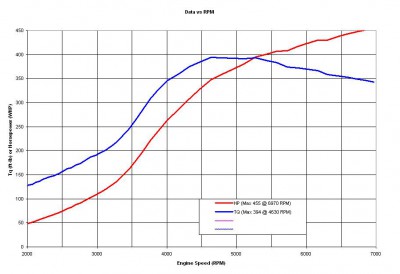
Just for giggles I tried your data in the RR Logger Road Dyno I created. Here's what I got: For Export 000.txt I assumed '04 WRX WGN 6MT, 4th gear. Attachment:
File comment: '04 WRX WGN, 6MT, 4th gear, 48F
 Export_000.png [ 28.63 KiB | Viewed 3954 times ]
For Export 001.txt I assumed '06 STi 6MT, 4th gear. Attachment:
File comment: '06 STi 6MT, 4th gear, 50F
 Export_001.png [ 27.24 KiB | Viewed 3959 times ]
What do you think? Dale
|
|
| Top |
|
|
|
Airboy
|
Post subject: Re: SPREADSHEET: import and graph log files Posted: Wed Feb 17, 2010 5:12 pm |
|
|
| RomRaider Donator |
Joined: Thu Aug 03, 2006 1:40 am
Posts: 1067
Location: Calgary
|
dschultz wrote: Just for giggles I tried your data in the RR Logger Road Dyno I created. Here's what I got: For Export 001.txt I assumed '06 STi 6MT, 4th gear. Attachment: Export_001.png What do you think? Dale Missed the development of the road dyno function in the logger...good job  . I just read the posts in the road dyno thread. I'll ask my questions there.
|
|
| Top |
|
|
|
Lance Lucas
|
Post subject: Re: SPREADSHEET: import and graph log files Posted: Wed Feb 17, 2010 5:59 pm |
|
|
| RomRaider Donator |
Joined: Wed Feb 06, 2008 8:10 pm
Posts: 367
|
dschultz wrote: Just for giggles I tried your data in the RR Logger Road Dyno I created. Here's what I got: For Export 000.txt I assumed '04 WRX WGN 6MT, 4th gear. Attachment: Export_000.png For Export 001.txt I assumed '06 STi 6MT, 4th gear. Attachment: Export_001.png What do you think? Dale Cool! I still do plenty of reflash-based tuning and this should be very helpful...it's always nice to reduce the number of programs/tools necessary to get the job done. Has anyone tried any of the road dyno options for logs taken during chassis dyno pulls? I'll take a couple logs using RR in a Subaru on our Mustang Dyno and see what happens 
_________________
2004 WRX Wagon and 2013 STI Sedan
|
|
| Top |
|
|
|
Airboy
|
Post subject: Re: SPREADSHEET: import and graph log files Posted: Wed Feb 17, 2010 6:10 pm |
|
|
| RomRaider Donator |
Joined: Thu Aug 03, 2006 1:40 am
Posts: 1067
Location: Calgary
|
Lance Lucas wrote: dschultz wrote: Just for giggles I tried your data in the RR Logger Road Dyno I created. Here's what I got: Has anyone tried any of the road dyno options for logs taken during chassis dyno pulls? I'll take a couple logs using RR in a Subaru on our Mustang Dyno and see what happens Don't think you could use the data from the chassis dyno runs because the resistance is provided by the dyno rollers and brakes so the acceleration data (rpm vs time) is controlled by the dyno computer. This is really apparent for dynos that uses linear ramp rates (dyna pak, dyno dynamics), the "acceleration" is fixed regardless of the power output of the engine.
|
|
| Top |
|
|
Who is online |
Users browsing this forum: No registered users and 6 guests |
|
You cannot post new topics in this forum
You cannot reply to topics in this forum
You cannot edit your posts in this forum
You cannot delete your posts in this forum
You cannot post attachments in this forum
|

|


